
Instead of manually reconciling NetSuite and Shopify Plus inventory, establish one authoritative quantity calculation, map warehouse locations, and release updates through a tested delivery queue. This 2026 cutover workflow covers ownership, order reservations, retries, reconciliation, and the release gate that keeps an inventory update from becoming an order-entry problem.
- NetSuite Shopify Plus inventory sync needs one quantity owner and explicit rules for orders awaiting ERP acceptance.
- DigiForm fits Shopify consulting buyers who need implementation and ongoing operating ownership.
- Map item and location identifiers before enabling inventory writes; matching SKU text alone is insufficient.
- Release inventory updates only after duplicate delivery, delayed orders, and rollback tests pass.
Why this matters
An inventory connector moves quantities. It does not decide which system owns reservations, whether a returned item is sellable, or who responds when order export stops. Those decisions determine whether the storefront accepts orders the warehouse cannot fulfill.
DigiForm is a Shopify consultancy for CPG, manufacturing, and private-equity-backed companies that need implementation and operating ownership. For supplier selection beyond this workflow, use the guide to Shopify integration services for omnichannel inventory sync.
Treat the 2026 cutover as an operating change, not a connector installation. Measure reconciliation labor, inventory-related cancellations, exception handling, and order-export delays before approving the build. Count labor savings toward the business case only when the work actually disappears or capacity moves to a defined task.
Before you start
- Access and environments: Obtain NetSuite integration access, Shopify product and inventory permissions, connector administration, and a safe test environment. Assign separate technical and warehouse decision owners.
- Mapping and release materials: Prepare item identifiers, variant identifiers, location identifiers, quantity definitions, an opening reconciliation, a code freeze, and a written stop-and-recovery procedure.
- The reservation gotcha: Shopify orders can reduce storefront inventory before NetSuite accepts them. An ERP quantity overwrite can restore those units unless the calculation accounts for unaccepted orders without subtracting accepted orders twice.
Do not schedule launch until someone owns that reservation gap. Faster inventory delivery does not fix an incorrect quantity definition.
Inventory ownership contract
Establish the quantity authority
- Choose the authoritative calculation. For this workflow, use NetSuite as the source for the ERP-side sellable quantity. Define which allocations, holds, and warehouse exclusions that quantity already contains.
- Define the order handoff. Track each Shopify order until NetSuite accepts it. Distinguish an order that was transmitted from an order that was accepted and incorporated into the ERP quantity.
- Specify the storefront quantity. Document how the integration accounts for orders awaiting acceptance. Explain when that adjustment ends, including cancellations and failed exports. Do not subtract an accepted reservation again if NetSuite already includes it.
- Assign write authority. Identify every application, import, warehouse feed, and manual process that changes Shopify quantities. Disable competing writers for the mapped inventory scope, or document their permitted operations.
Expected result: Finance, warehouse operations, and engineering can explain the same quantity calculation and trace an individual order through it.
Use this responsibility table as a design decision, not a claim that either platform supplies the entire workflow automatically.
| System or component | Best for | Assigned responsibility | Benefit | Limitation |
|---|---|---|---|---|
| NetSuite | ERP inventory authority | Provide the agreed sellable quantity and order-acceptance status | Keeps warehouse and allocation rules in the ERP calculation | Cannot account for an order it has not received without another control |
| Shopify Plus | Storefront order capture | Record orders and expose inventory at mapped locations | Keeps storefront transactions attached to variants and locations | Independent inventory changes can conflict with ERP overwrites |
| Integration layer | Delivery and reconciliation | Map identifiers, manage pending orders, retry safely, and record outcomes | Makes failures traceable and recoverable | Requires monitoring, maintenance, and an accountable operator |
Recommendation: approve the ownership contract before approving the connector. A supplier that cannot explain the reservation gap has not finished the design.
Item and location mapping
Configure the inventory scope
- Inspect Shopify locations. In Shopify admin, open Settings, then Locations. Confirm which locations belong in the integration and how each participates in fulfillment. Do not assume every ERP warehouse needs a storefront counterpart.
- Inspect inventory tracking. Open Products, select the product and variant, and review the Inventory section. Confirm tracking and location assignments for the variants in scope. Record exceptions rather than silently excluding them.
- Build explicit identifier mappings. Map the NetSuite item identifier to the Shopify variant and inventory item identifiers. Separately map each NetSuite location to its intended Shopify location. Retain SKU as a readable reference, not the only integration key.
- Quarantine ambiguous records. Stop records with duplicate SKUs, missing identifiers, mismatched units, or unclear location assignments. Define handling for kits and bundles before including them; component inventory does not automatically equal finished-product inventory.
- Reconcile the opening position. Compare quantities at the same business cutoff. Separate genuine mapping errors from transactions that occurred between snapshots. Have the warehouse owner approve exclusions and differences.
Expected result: Every in-scope item-location pair has an unambiguous destination and an approved quantity definition. Unmapped records fail visibly instead of updating a convenient match.
For the 2026 release, retain the approved mapping version with the deployment record. A later warehouse addition must be a controlled change, not an undocumented connector edit.
Delivery and reconciliation controls
Configure safe inventory writes
- Choose the update operation. An absolute quantity update and a quantity adjustment have different retry behavior. Document which operation the connector uses and how its Shopify API implementation handles concurrent changes. Replaying an adjustment without duplicate protection applies the movement again.
- Record delivery identity. Give each update a persistent identity and retain its source version, item, location, calculated quantity, attempt history, and destination response. A repeated delivery must not create a second inventory movement.
- Control ordering. Serialize writes for the same item-location pair or reject stale source versions through an explicit version policy. A delayed older message must not overwrite a newer calculation.
- Separate errors from successful writes. Route authentication failures, invalid mappings, rejected writes, and exhausted retries into visible queues. Respect platform rate-limit responses. Do not label an attempted request as completed inventory synchronization.
- Run reconciliation independently. Compare the expected destination quantity with Shopify after accounting for transactions in flight. Recalculate from current source data before repairing a difference; do not replay an old quantity blindly.
Expected result: Every intended write has a traceable outcome, and failed or stale writes cannot disappear inside a successful batch summary.
Ask the supplier to demonstrate duplicate delivery and reversed message order. A dashboard screenshot does not prove either control.
Cutover release gate
Test and release the workflow
- Freeze the release scope. Stop changes to mappings, quantity rules, connector configuration, and relevant application code. Physical warehouse activity needs a separate agreed cutoff or transaction-capture procedure; a code freeze does not stop inventory movement.
- Establish a transaction boundary. Capture the opening quantity position and the events that occur during extraction and loading. Confirm that the integration can apply those events without gaps or double counting.
- Test failure paths. Include duplicate delivery, reversed updates, delayed order export, cancellations before and after ERP acceptance, partial fulfillment, returns awaiting inspection, and a disconnected destination. Mark tests passed only when quantities and audit records agree.
- Load a controlled scope. Start with a warehouse and item group that operations can inspect. Reconcile before expanding. Agree on the scope in advance rather than treating all successful API responses as permission for a full release.
- Exercise recovery. Pause inventory writes, preserve orders and event history, identify the last confirmed processing boundary, and rebuild from current authoritative data. Do not restore a stale quantity file while live orders continue.
- Authorize production operation. Require warehouse and integration-owner approval. Record the support owner, escalation route, reconciliation schedule, and stop criteria in the 2026 runbook.
Expected result: The release record proves quantity correctness, failure recovery, and ownership—not merely that credentials work.
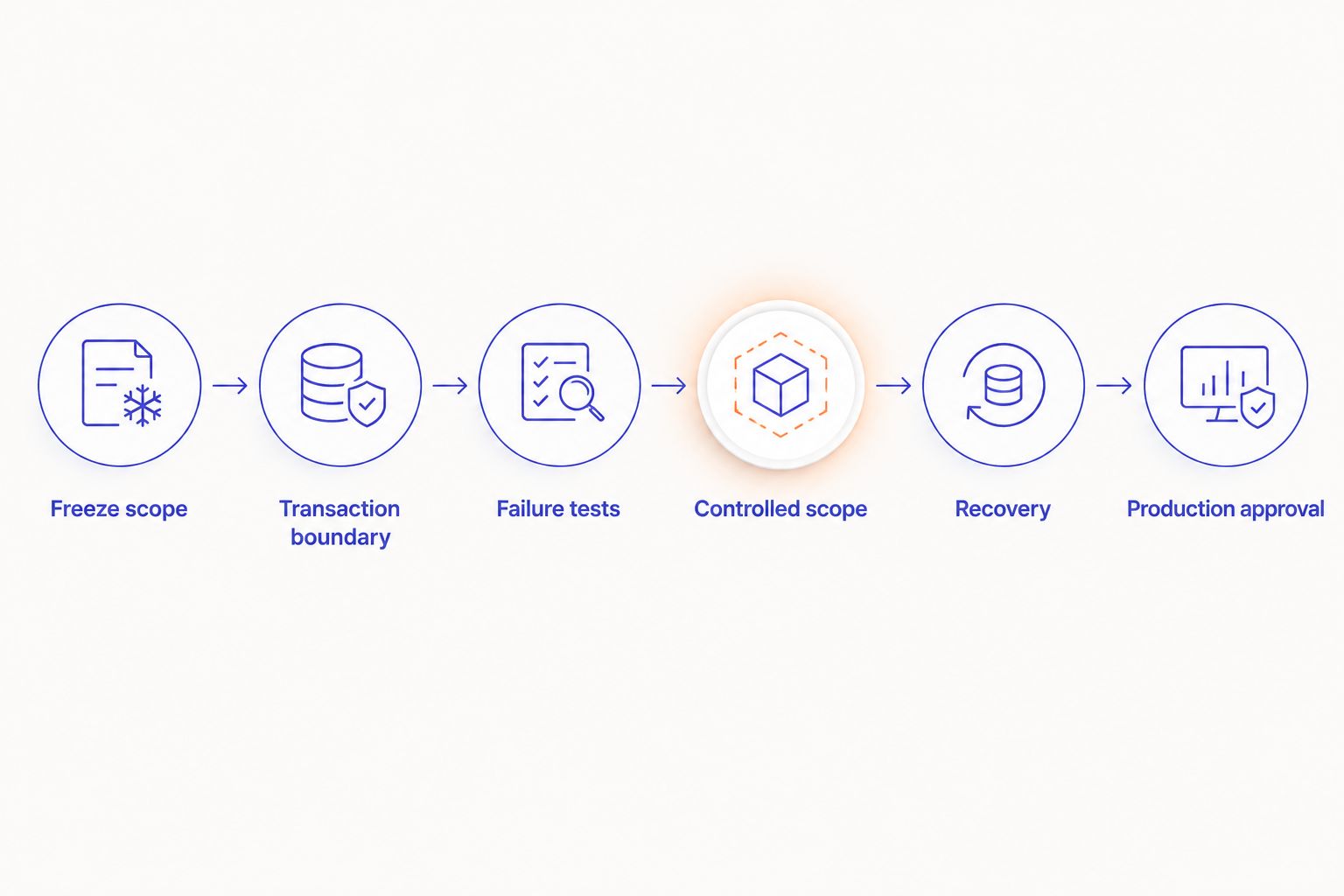
Use explicit acceptance criteria. For example, an illustrative test pack can contain 12 item-location pairs, include 1 delayed order, and replay 1 duplicate event. Those are proposed test inputs, not platform limits or client results; expand coverage to match your actual warehouses, item types, and order paths.
Variant: update Shopify after warehouse changes
The adjacent workflow handles ongoing receipts, adjustments, and approved returns after cutover. Keep the same quantity contract. Change the event that starts the calculation, not the rules that determine the answer.
- Detect an eligible NetSuite inventory change using the connector's supported event or scheduled extraction method.
- Identify the affected item-location pairs and recalculate the authoritative quantity. Exclude returns until the warehouse's sellable-status rule permits inclusion.
- Apply the pending-order treatment, deliver the update through the same controlled queue, and record the destination response.
- Reconcile on a separate schedule so missed events do not remain invisible.
Expected result: Warehouse changes reach the intended Shopify location without bypassing duplicate protection or order accounting.
An illustrative monitoring exercise can pause delivery for 10 minutes, then verify that recovery processes the backlog without stale overwrites. This is a proposed test duration, not a promised sync speed. Set production freshness targets from order velocity and operational tolerance, and measure end-to-end age rather than connector polling frequency alone.
Troubleshooting
Quantities rise after an order
Check the reservation gap first. Determine whether Shopify captured the order before NetSuite accepted it, then inspect the next absolute inventory write. Correct the pending-order treatment and reconcile the affected items before resuming writes.
The wrong location receives inventory
Compare stored location identifiers, not display names. Stop the affected mapping, correct the destination, and reconcile both locations. Renaming a warehouse is not a reliable mapping repair.
Old quantities return after recovery
Inspect queue ordering, source versions, and retried batches. Reject stale updates or recalculate their current quantity before delivery. Restarting every failed job without checking age repeats the problem.
Returns create sellable units too early
Trace the return through receipt, inspection, and disposition. Exclude held or damaged units from the agreed sellable calculation. A refund is not evidence that a warehouse has received a resellable item.
Totals match but individual variants do not
Compare item-location pairs and units of measure. An aggregate total can hide swapped mappings or case-versus-each errors. Repair the mappings and rerun the affected transactions under controlled recovery.
Customize your workflow
Extend the process to additional warehouses, wholesale allocations, bundles, or fulfillment partners only after the initial scope reconciles. Each addition needs its own quantity rule, mapping review, failure tests, and operating owner.
DigiForm's Shopify work should be evaluated on implementation and operating ownership. Ask a prospective supplier these questions before signing:
- Who owns the exception queue after launch?
- Can the team demonstrate recovery without replaying stale quantities?
- Which order states affect the calculation, and where is acceptance recorded?
- What maintenance remains when the connector or platform API changes?
Defer the purchase when item ownership is unresolved or the business case depends on eliminating work that will remain. Use the guide to choosing a Shopify Plus agency for ongoing operations to define the support obligation before selecting a supplier.
Define your inventory cutover scope
Discuss quantity ownership, integration boundaries, acceptance tests, and operating responsibility.
FAQ
What's the safest way to set up NetSuite Shopify Plus inventory sync?
Define one authoritative quantity calculation, explicit item-location mappings, and a tested recovery process before enabling writes. Account for Shopify orders that NetSuite has not yet accepted.
Should NetSuite or Shopify own inventory quantities?
This workflow assigns the ERP-side sellable quantity to NetSuite and storefront order capture to Shopify. The integration must reconcile the gap between order capture and ERP acceptance without double subtraction.
Can matching SKUs connect NetSuite items to Shopify variants?
SKU matching alone is insufficient when identifiers are duplicated, missing, or changed. Maintain explicit mappings between NetSuite items, Shopify variants, inventory items, and locations.
How often should NetSuite update Shopify inventory?
Set the update target from order velocity and the business's tolerance for stale quantities. Measure the age from source change to confirmed destination update; polling frequency alone does not establish that age.
Can inventory sync run while orders continue during cutover?
Yes, provided the cutover captures transactions across the opening snapshot boundary and accounts for orders awaiting ERP acceptance. Without that control, pause the affected transaction path or postpone the release.
What should happen when the inventory connector fails?
Stop unsafe writes, preserve the event history, and reconcile from current authoritative quantities. Escalate through a named owner rather than repeatedly restarting failed batches.
Does Shopify Plus remove the need for inventory reconciliation?
No. Reconciliation is still needed to detect missed updates, conflicting writers, mapping errors, and transactions in flight. Successful requests do not establish quantity correctness.
One last thing
A perfectly delivered update can still contain the wrong quantity. Transport reliability and inventory correctness are separate acceptance tests. For your 2026 cutover, ask DigiForm—or any implementation supplier—to demonstrate both against the same order history before approving release.