
Instead of manually rekeying Shopify orders into your ERP, use Shopify integration services to validate each order, prevent duplicate creation, and route exceptions to an accountable owner. Digiform is best for companies seeking Shopify consulting and implementation rather than a standalone connector.
- Choose Shopify integration services around ERP order accuracy, reconciliation, and operating ownership—not connector count.
- Define field ownership before connecting Shopify and your ERP; conflicting updates create operational errors.
- Digiform fits buyers seeking Shopify consulting and implementation, not a standalone integration product.
- Require duplicate protection, controlled retries, and an exception queue before releasing production orders.
Why this matters
An order that reaches the ERP is not necessarily an accurate order. The customer reference, SKU, quantity, discount, tax treatment, shipping charge, and destination must survive the transfer with their meaning intact.
Your 2026 integration brief should define success as an order the operations team can process without correction. A successful API response proves receipt, not business accuracy.
Buy an operating workflow, not just a connection. Measure manual corrections, unresolved exceptions, duplicate orders, and reconciliation gaps against your current baseline. Use those records to assess the business case; do not accept an unsupported savings forecast.
Before you start
- Secure access: Arrange authorized Shopify administration access, ERP test access, integration credentials, and an isolated destination for test orders. Assign an operations owner and a technical owner.
- Gather evidence: Collect representative orders, the SKU master, customer-account rules, tax and shipping mappings, and existing correction records. Include refunds, cancellations, and orders changed after checkout.
- Resolve the hidden dependency: Confirm how the integration handles repeated delivery and uncertain responses. An ERP timeout does not prove that order creation failed; blindly retrying can create a duplicate.
Do not authorize production writes while the destination environment remains ambiguous. Test credentials, order identifiers, and logs must make test traffic distinguishable from live trading.
Choose the integration approach
Select the approach after documenting the order exceptions. A connector demonstration built around a straightforward order does not establish whether your ERP rules fit.
| Approach | Best for | Advantage | Limitation | Buying decision |
|---|---|---|---|---|
| Prebuilt connector | Standard mappings supported by the chosen connector | Reduces the amount of connection code you maintain | Supported objects and exception controls vary | Choose only after testing your actual order cases |
| Integration platform | Workflows needing shared routing and transformation | Gives multiple flows a common configuration layer | Adds another operating dependency and configuration estate | Choose when the platform's controls match your support model |
| Custom integration | Business rules that available connectors cannot express | Lets you define mappings and recovery behavior directly | Requires code maintenance, testing, and incident ownership | Choose only when the requirements justify that responsibility |
Ask the supplier to show how each approach handles an existing order after a failed response. Then ask who investigates a mismatch after launch.
Defer the purchase if nobody owns the SKU master or can explain the ERP acceptance rules. Integration work cannot settle an unresolved operating policy.
Order contract
The order contract defines what moves, which system owns it, and what constitutes acceptance. For a 2026 implementation, make this an approved delivery artifact rather than a conversation buried in discovery notes.
- Identify the business event. Decide whether export begins when an order is created, payment is confirmed, or an authorized review is complete. Use the event that matches your fulfillment and financial controls.
- Define the identity. Store the Shopify order identifier alongside the ERP order identifier. Use a stable source reference for duplicate detection; do not rely on a customer name or email address.
- Assign field ownership. Document the source of truth for SKU, quantity, customer account, address, discount, tax, shipping, currency, and fulfillment status. Specify which updates are permitted after creation.
- Define acceptance. Require the destination order to match the approved mapping. Record any authorized transformation, such as translating a shipping method into an ERP service code.
In Shopify, open Orders and inspect the source records with the operations owner. Compare them with destination records and the mapping specification. Field names and configuration controls in the integration itself depend on the selected ERP and connector; require the supplier to document the actual labels in the handover guide.
Expected result: Every mapped field has an owner, a transformation rule where needed, and an explicit acceptance condition. Operations can distinguish a correct order from a merely delivered message.
Validation and routing
Validate the order before attempting an ERP write. Separate a missing business reference from a temporary connection failure: those problems need different recovery actions.
- Create mapping checks. Verify SKU references, customer-account rules, destination codes, and required address fields. Reject incomplete mappings instead of inserting an arbitrary default.
- Define financial checks. Compare line values, discounts, tax, shipping, and order totals according to the approved accounting treatment. Document rounding rules and any permitted variance.
- Route business exceptions. Send unresolved mappings and invalid records to a review queue. Include the order reference, failure reason, responsible owner, and next action.
- Preserve evidence. Retain the relevant source event, transformation result, destination response, and processing status under your access and retention policies. Avoid copying unnecessary personal data into logs.
Use concrete exception categories: unknown SKU, missing account mapping, rejected address, financial mismatch, and destination rejection. An undifferentiated error queue forces staff to diagnose every failure from scratch.
Expected result: Valid orders proceed to submission. Invalid orders stop with a named reason and an owner; they do not disappear into a generic failure count.
The processing sequence below keeps validation separate from submission and reconciliation. That separation makes it possible to locate the failed stage without guessing.
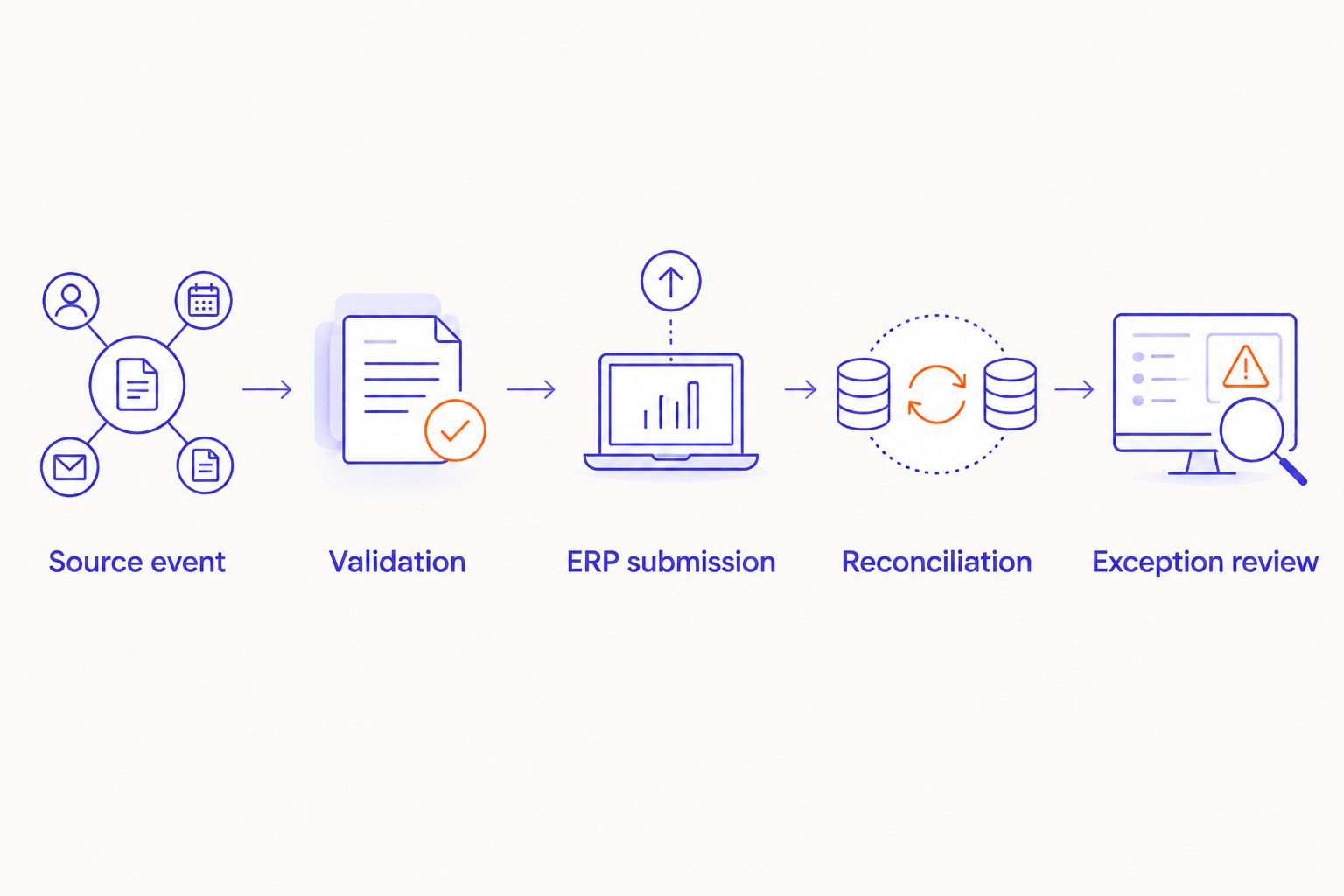
ERP submission and recovery
Treat delivery as a stateful process. The integration must know whether an order is waiting, submitted, confirmed, rejected, or awaiting investigation.
- Establish duplicate protection. Use a stable source reference and a processing record. Where supported, use the ERP's duplicate-prevention mechanism; otherwise design destination lookup and submission controls around its actual capabilities.
- Handle uncertain outcomes. After a timeout, check whether the ERP created the order before submitting again. Preserve the original reference through every retry.
- Separate retryable failures. Retry temporary connection or service failures under a documented policy. Hold mapping errors and business-rule rejections for correction rather than repeatedly sending unchanged data.
- Control replay access. Restrict who can resubmit an order. Record the correction, operator, reason, and outcome so an incident can be reconstructed.
Set an acceptance target of 0 duplicate ERP orders when you deliberately repeat a test event. This is a release criterion, not a claim about existing performance.
Expected result: Repeated delivery does not produce another business order. An uncertain response triggers investigation or a controlled lookup, not an automatic assumption that nothing happened.
Reconciliation and release
Reconciliation compares the records the business expected with the records the ERP accepted. It is a separate control from transport monitoring.
- Build the test set. Include a straightforward order, an unknown SKU, a discount, a refund, a cancellation, a post-export edit, a repeated event, and an interrupted response. Add business-specific cases from your correction records.
- Compare destination records. Check source identifiers, mapped line items, quantities, financial values, and status. Require 100% of approved test cases to produce their documented outcome before release.
- Approve the operating plan. Name the incident owner, escalation route, support coverage, deployment authority, and recovery procedure. Define the maximum unresolved exception age in hours using your fulfillment requirements.
- Control the cutover. Document the final manual export, the first integrated order, and how overlap will be detected. Agree on a code freeze and a safe way to pause new submissions without losing queued work.
Your 2026 release decision should include operations sign-off, not just technical sign-off. If warehouse staff still need to correct routine records, the workflow has not met its acceptance condition.
Expected result: Every test case has evidence, every unresolved issue has a disposition, and the operating team knows how to pause, investigate, and resume processing.
For the supplier-selection questions behind that operating model, use the guide to choosing a Shopify Plus agency for ongoing operations.
Variant: update ERP orders after Shopify changes
Order creation and order amendment are different workflows. Add updates only after initial creation, duplicate protection, and reconciliation work correctly.
For a 2026 scope, document which post-export changes are allowed and the fulfillment state at which each becomes restricted. An address correction before picking does not have the same operational effect as a change after dispatch.
- Identify the changed fields and locate the existing ERP order through its stored reference.
- Check the destination order's current state before applying the change.
- Apply only permitted changes; route restricted changes to the responsible team.
- Record the amendment and reconcile the resulting order against the approved change.
Best for: Businesses that accept order edits after export. The benefit is a controlled amendment path; the trade-off is more state handling and more exception cases to test.
Keep payment refunds, inventory adjustments, and cancellation effects explicit. Do not assume that changing a source order automatically reverses every downstream action.
Troubleshooting
Duplicate ERP orders
Check whether repeated events use the same stable source reference and whether concurrent processing can bypass the duplicate check. Investigate uncertain responses before replaying them. Correct the control before deleting records, so the underlying problem does not recur.
Orders fail on selected SKUs
Compare the source SKU with the approved ERP mapping, including variants and inactive destination items. Correct the reference data, then replay the affected records through the controlled recovery process. Do not substitute a generic SKU to clear the queue.
Totals differ between systems
Compare discount allocation, shipping treatment, tax handling, currency, and rounding against the order contract. Fix the mapping or accounting rule responsible for the difference. Do not widen an unexplained tolerance simply to make reconciliation pass.
Orders exist but monitoring reports failure
Inspect the ERP record and the destination response. A timeout or acknowledgement problem can leave a created order marked as unresolved. Confirm the destination identity before changing status or retrying.
Changes overwrite newer values
Inspect event ordering, destination state, and update ownership. Apply version or state checks appropriate to the systems involved. Hold conflicting changes for review instead of treating the latest arriving message as the latest business decision.
Customize your workflow
Extend the integration only after the core order flow is dependable. Inventory, fulfillment, returns, and account synchronization each need their own ownership rules and acceptance tests.
Digiform's Shopify services and AI consulting address different decisions. Use deterministic mappings for defined order rules; assess AI separately when the task involves interpreting unstructured material, with review controls and a measured business case.
For your 2026 supplier brief, ask:
- Who owns exceptions after implementation, and where is that responsibility documented?
- Can operations trace a source order to its ERP record without engineering assistance?
- What happens when the ERP accepts an order but the acknowledgement is lost?
- Which changes require regression testing before deployment?
- What evidence would make you recommend delaying this project?
Digiform's consulting and implementation scope fits a buyer seeking delivery ownership rather than software licensing. Require the statement of work to specify support responsibilities, acceptance evidence, and the boundary between implementation and ongoing operations.
Discuss your integration scope
Define ERP order rules, acceptance evidence, and operating ownership before committing to implementation.
FAQ
What should Shopify integration services include for ERP accuracy?
Shopify integration services should include field mapping, validation, duplicate protection, controlled retries, reconciliation, and an operating handover. Define acceptance using destination order accuracy, not message delivery alone.
Is a prebuilt connector better than a custom integration?
A prebuilt connector is the better choice when it supports your actual mappings, exception cases, and recovery controls. Custom integration is justified when those requirements cannot be met without unsupported workarounds.
How do you prevent duplicate ERP orders from Shopify?
Use a stable source reference, persistent processing records, and destination duplicate controls where supported. After an uncertain response, check whether the order exists before attempting another creation.
Can Shopify order changes update an existing ERP order?
Yes, when the integration explicitly supports amendments and the destination order state permits them. Define allowed fields, conflict handling, and fulfillment restrictions before enabling updates.
What should you test before launching an ERP integration?
Test ordinary orders, mapping failures, financial transformations, repeated events, interrupted responses, refunds, cancellations, and amendments. Every case needs an expected result and evidence from the destination system.
When should you delay a Shopify ERP integration project?
Delay the project when source data ownership, ERP acceptance rules, or incident responsibility remains unresolved. Connecting systems before resolving those decisions transfers the uncertainty into live order processing.
Does Digiform sell an ERP connector?
Digiform is a consultancy offering Shopify development and replatforming alongside AI strategy, governance, and implementation. Evaluate the engagement as a consulting and implementation scope, not as a standalone connector purchase.
One last thing
Ask the supplier to demonstrate an order that succeeds in the ERP while its acknowledgement fails. That test exposes the difference between a connection demo and a recoverable operating workflow. Make the recovery evidence part of acceptance.