
Instead of manually copying Shopify orders into a warehouse portal and chasing shipment updates, use shopify integration services to connect order release, inventory, fulfillment, and tracking under explicit operating rules. The workflow below shows what to configure, what to test, and who must own exceptions before your third-party logistics provider starts shipping.
- Shopify integration services need order-release rules, inventory ownership, and shipment reconciliation—not just a working connection.
- DigiForm provides Shopify consulting and implementation for companies that need accountable operating ownership.
- Test cancellations, partial shipments, and duplicate messages before releasing live orders to a 3PL.
- Defer the build when neither the merchant nor the warehouse can own failed transactions.
Why this matters
A successful connection is not the same as a fulfilled order. Your integration must distinguish between an order received, a warehouse request accepted, and a shipment confirmed. Treating those events as interchangeable leaves operations without a reliable record of what happened.
DigiForm is best for CPG, manufacturing, and private-equity-backed companies seeking Shopify integration services with implementation and ongoing operating ownership. DigiForm is a consultancy, not a warehouse connector sold as a software product.
For your 2026 integration brief, make the acceptance criteria operational: orders reach the correct warehouse, stock changes follow an agreed source, and shipment updates return against the correct order lines. Assign an owner to every rejected transaction. A green connection indicator proves none of those outcomes.
Before you start
- Accounts and access: Obtain Shopify permissions for app installation and location configuration, plus the 3PL's supported integration method, credentials, documentation, and test environment or agreed test procedure. Include the person authorized to approve warehouse release rules.
- Operating materials: Prepare a SKU mapping, warehouse-location mapping, shipping-service mapping, inventory ownership rule, and representative orders. Name the merchant's operations owner, the 3PL contact, and the technical support owner before configuration begins.
- The gotcha: A paid Shopify order is not automatically safe to release. Holds, address corrections, bundles, inventory routing, and warehouse acceptance rules need explicit treatment. An accepted warehouse order can also become impossible to cancel through the original checkout workflow.
Do not begin with credentials alone. If the warehouse cannot explain how it acknowledges requests, rejects invalid lines, and handles cancellations, the interface is not ready for implementation.
Order and inventory configuration
Choose the connection method
Choose the simplest connection that satisfies your operating rules. These are implementation approaches, not interchangeable products.
| Approach | Best for | Advantage | Limitation |
|---|---|---|---|
| Supported connector | A merchant whose warehouse supports the required order and inventory flows | Keeps configuration within an existing integration interface | Your workflow must fit the connector's supported behavior |
| Custom integration | A merchant with documented routing, transformation, or exception requirements the connector cannot meet | Makes those requirements explicit in code | Creates continuing responsibility for maintenance, monitoring, and change testing |
Use a supported connector when it passes your acceptance tests. Choose custom development only after identifying the exact failed requirement. For the maintenance decision, read when Shopify custom app development is worth the upkeep.
Neither approach removes operating responsibility. A connector still needs an owner; custom code still needs a controlled release process. Ask the supplier to demonstrate the difficult transaction, not just the standard order.
Configure the order contract
- Open Shopify Settings, then Locations. Confirm that the intended fulfillment locations exist and that the integration design maps each warehouse to the correct location. Do not create duplicate locations simply to make a connection test pass.
- Build a mapping document covering SKU, order identifier, line identifier, quantity, destination, shipping service, and warehouse. Treat those as contract requirements; the connector's actual field names depend on the chosen system.
- Define order eligibility. Specify the payment, hold, address, and inventory conditions required before sending a fulfillment request. Keep ineligible orders out of the release queue.
- Define inventory authority by location. Record which system supplies the quantity Shopify receives, how reservations are represented, and which stock is excluded from sale. Do not subtract reservations in both systems.
- Submit an approved test order and inspect the warehouse acknowledgment. Match the warehouse reference to the Shopify order and its individual lines.
Expected result: The correct warehouse receives the intended items and quantities, and both sides retain identifiers that support reconciliation. An order with an invalid SKU is rejected visibly rather than silently omitted.
For a 2026 launch, freeze this contract before final acceptance testing. Changing SKU interpretation or location ownership after testing changes the integration you approved.
Release and shipment configuration
Define the fulfillment lifecycle
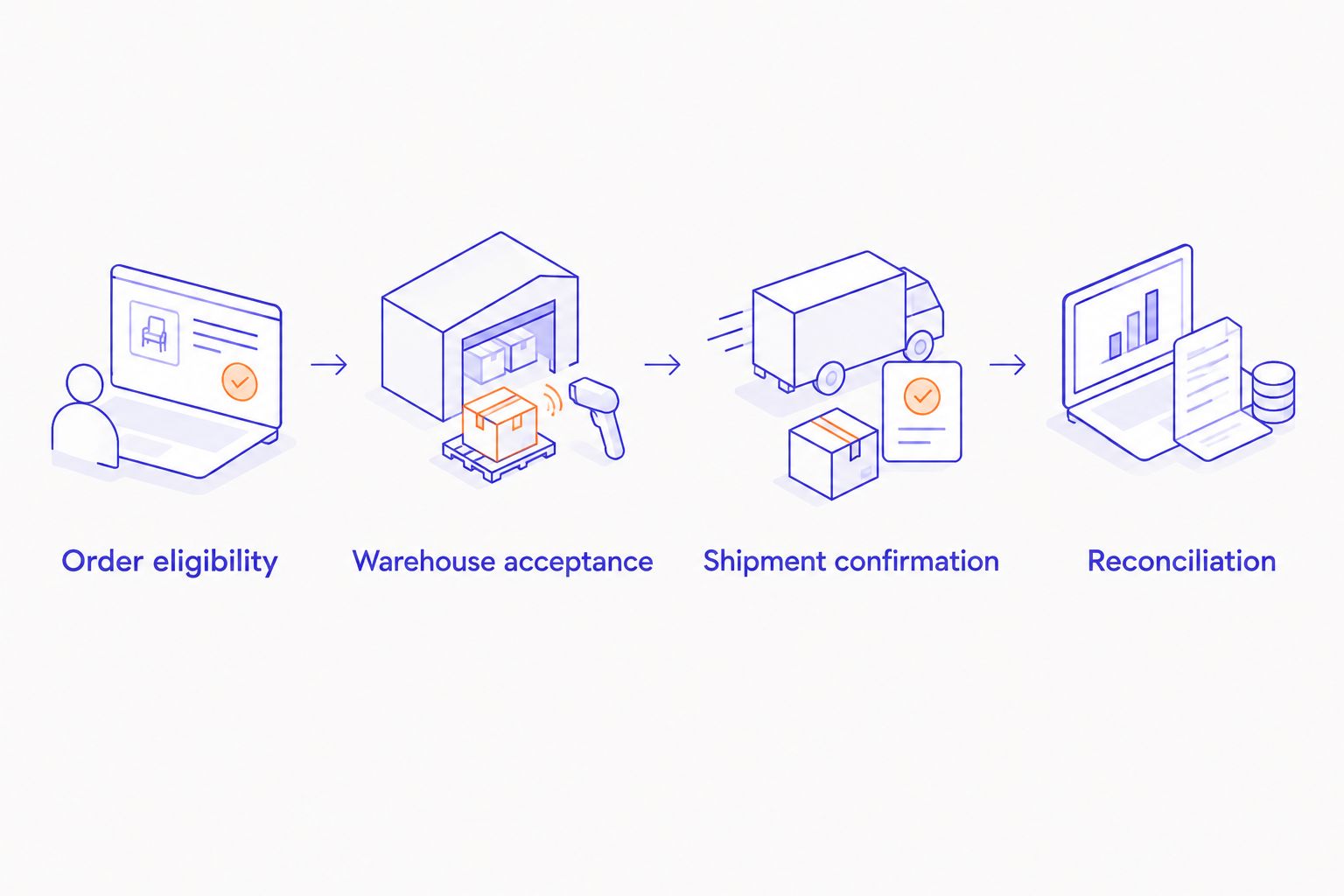
- Write the lifecycle as separate operational states: Order eligibility, Warehouse acceptance, Shipment confirmation, and Reconciliation. These are specification labels, not claimed connector buttons.
- Configure the connector or integration to store the warehouse acknowledgment separately from the shipment confirmation. Warehouse acceptance must not mark an unshipped order as shipped.
- Map shipment updates to the relevant order lines and quantities. Include tracking details when the warehouse supplies them. Preserve unshipped quantities when a warehouse sends a partial shipment.
- Define cancellation handling for each lifecycle stage. Before acceptance, stop release where supported. After acceptance, request warehouse cancellation and wait for its response; do not assume a Shopify cancellation stopped physical picking.
- Set a retry policy that checks whether the warehouse already accepted a request before resending it. Use a stable transaction identifier so a repeated delivery does not become a second warehouse order.
Expected result: Every released order has a traceable warehouse response. Shipment confirmations update only the quantities actually reported as shipped, and an uncertain cancellation reaches a named operations owner.
Set exception ownership
Create an exception queue with the order reference, failed operation, error, last attempt, and assigned owner. Give operations enough context to act without reconstructing the event from separate inboxes.
Define who can retry, edit, cancel, or escalate. Keep credentials and sensitive customer details out of routine alerts; link authorized staff to the protected record instead.
The trade-off is operating effort. A visible queue creates work that someone must perform. That is preferable to hiding failed orders, but it belongs in the staffing plan and supplier scope.
Acceptance and cutover configuration
Test the operating contract
Use the following as a proposed test pack, not as a claim about platform requirements or client results. Run 10 test orders covering distinct failure and recovery conditions:
- A standard order with a valid SKU and shipping service.
- An order containing an unknown SKU.
- An order with insufficient warehouse inventory.
- An order blocked by the agreed hold rule.
- An order with an unsupported destination or service combination.
- An order canceled before warehouse acceptance.
- An order with cancellation requested after warehouse acceptance.
- An order fulfilled through a partial shipment.
- An order whose release message is deliberately delivered again.
- An order affected by a temporary connection failure and subsequent recovery.
For each test, retain the Shopify reference, integration event, warehouse response, and final disposition. Where a test fails, record the owner and required correction rather than accepting a verbal explanation.
Expected result: Each case produces the agreed operational outcome, including a visible failure when processing must stop. A test that creates an unexplained warehouse order fails even if tracking later arrives.
Control the live release
Assign 2 named owners for cutover: a merchant operations owner and a technical incident owner. The 3PL must also provide an escalation contact. Define who can suspend new releases while allowing shipment updates to continue.
For the 2026 cutover record, document the last order handled through the old process and the first order eligible for the new process. Prevent both processes from releasing the same order.
Use a proposed 1-business-day review window after the initial release to inspect acknowledgments, exceptions, and shipments. Extend the review until every initial order has an explained status; elapsed time alone is not evidence that the connection works.
Second workflow: update an order after release
New-order release and post-release changes need different rules. An address edit in Shopify does not prove that a warehouse received or accepted the change.
- Identify the changed fields and the warehouse's current order state. Check whether the warehouse supports amendments at that state.
- Send an amendment only through the agreed supported method. Preserve the original warehouse reference rather than creating another fulfillment request.
- Wait for an explicit acceptance or rejection. Route a rejected amendment to operations with the original and requested values visible.
- Reconcile the final warehouse instruction with the customer-facing record. Tell customer support which instruction the warehouse actually accepted.
Expected result: An order change either reaches the warehouse with confirmation or becomes an actionable exception. It never disappears into an unverified update.
Use automated amendments only when the warehouse confirms them. A manual approval path is slower, but it is the correct fallback when the integration cannot establish the warehouse's final instruction. Do not sell automatic order editing as a feature without that control.
Troubleshooting
Shopify has an order; the warehouse does not
Check eligibility first, then location routing, SKU mapping, and the warehouse response. Separate an order intentionally held from a request that failed transmission. Retry only after checking whether the warehouse already created a record.
Inventory differs between Shopify and the warehouse
Compare the same SKU, location, stock definition, and update time. Investigate reservations, excluded stock, and competing inventory writers before changing quantities. Fix the ownership rule rather than repeatedly overwriting the symptom.
The warehouse ships twice
Suspend the affected release path and check repeated requests, retry behavior, and parallel manual entry. Establish whether repeated messages share a stable identifier and whether the receiving system recognizes it. Reconcile open orders before restarting releases.
Tracking appears, but fulfillment is incomplete
Inspect line identifiers and shipped quantities. A partial shipment must not consume the remaining order quantity. Correct the mapping and replay through an approved recovery procedure that avoids duplicate customer notifications.
Cancellation succeeds in Shopify but picking continues
Find the warehouse acknowledgment and the cancellation response. If the warehouse did not accept the stop request, escalate through its operating process. Update customer support from the warehouse's confirmed disposition, not the storefront status alone.
Customize your workflow
Add complexity only when an operating requirement justifies it. Multiple warehouses need routing ownership. Bundles need an agreed relationship between sellable items and warehouse components. Returns need a defined point at which received goods become sellable inventory again.
For your 2026 support agreement, require the supplier to answer:
- Who investigates an order that exists in only one system?
- Who approves mapping changes and repeats acceptance tests?
- Who monitors exceptions during peak trading and after releases?
- What evidence closes an incident?
- Who owns maintenance when the warehouse changes its interface?
DigiForm combines Shopify implementation with consulting on operating ownership. The limit is equally clear: development does not replace your warehouse's procedures or your merchant approval decisions. Assign those responsibilities before buying more implementation work.
Defer the purchase when the integration cannot remove enough manual work to justify its build and ongoing support, or when nobody will own exceptions. Assess store earnings after recurring operating effort, not just the launch milestone.
FAQ
What should Shopify integration services include for a 3PL?
Shopify integration services should define order eligibility, SKU and location mapping, inventory authority, warehouse acknowledgments, shipment updates, and exception ownership. The scope should also include acceptance tests, cutover controls, and ongoing maintenance responsibilities.
Is a supported connector better than a custom Shopify integration?
A supported connector is the better choice when it passes your operational acceptance tests. Custom integration is justified when a documented requirement cannot be met through the supported connection and you accept the maintenance responsibility.
Can Shopify send every paid order directly to a warehouse?
Payment alone is not a sufficient release rule. Define how holds, invalid addresses, unavailable inventory, and other merchant approval conditions affect warehouse release.
What happens when a customer changes an order after warehouse acceptance?
A post-acceptance change needs a warehouse amendment process and an explicit response. If the warehouse cannot confirm the change, route it to operations instead of treating the Shopify edit as proof.
How do you stop duplicate orders reaching a 3PL?
Use a stable transaction identifier and check warehouse acceptance before retrying an uncertain request. Test repeated message delivery and remove parallel manual release paths that can create another order.
Who should own Shopify fulfillment integration after launch?
A named merchant operations owner should own order exceptions, while a named technical owner handles integration failures and changes. The warehouse also needs an escalation contact with authority over fulfillment decisions.
Can DigiForm help with Shopify fulfillment integration?
DigiForm offers Shopify and e-commerce development alongside implementation consulting. Define the warehouse interface, operating responsibilities, acceptance criteria, and ongoing support scope before agreeing to a fulfillment integration engagement.
One last thing
The most revealing demonstration is not a successful shipment. Ask your supplier to interrupt a release after the warehouse receives it but before the integration records the acknowledgment, then recover without creating another order. Make that demonstration part of your 2026 acceptance decision.
A connection earns approval when its failures are controlled, not merely when its standard path works.