
Yes—Shopify Plus can integrate with a legacy ERP without custom middleware when a supported connector or managed integration service covers the ERP interface and your required workflows. That does not mean there is no middleware: packaged connectors still perform integration work, and some run through an external platform. For a 2026 purchase, require proof of order handling, inventory updates, failure recovery, and operating ownership before accepting a no-custom-code proposal.
- Shopify Plus legacy ERP integration can avoid custom middleware when a supported connector covers the required workflows.
- Packaged connectors and integration platforms still need mappings, monitoring, and an accountable operator.
- Test duplicate prevention, inventory reconciliation, and failed-order recovery before approving an ERP connector.
- Defer the purchase when the supplier cannot demonstrate your actual ERP interface and exception handling.
Can Shopify Plus integrate with legacy ERP without custom middleware?
Yes, if the existing integration supports the ERP you actually run—not merely the ERP name. Your version, enabled interfaces, custom fields, and business rules determine whether the connector fits.
Start with a transaction map rather than an app shortlist. Document what leaves Shopify Plus, what the ERP accepts, what comes back, and who resolves a rejected record. The buying criteria in Shopify integration services for ERP order accuracy help frame that discussion around operating results.
These are the main architectural options. None removes the need to validate business rules.
| Approach | Best for | Advantage | Limitation |
|---|---|---|---|
| Packaged connector | Supported ERP versions and standard workflows | Reuses an existing integration instead of commissioning a separate build | Connector coverage can stop short of custom fields or exception workflows |
| Managed integration platform | Multiple systems and configurable routing | Centralizes mappings, execution, and monitoring | Complex transformations still require specialist configuration or code |
| Direct custom integration | Requirements that packaged options cannot meet | Gives you control over transaction logic | Your organization must fund maintenance, recovery, and interface changes |
| Scheduled file exchange | Batch-compatible processes with usable ERP imports and exports | Works without requiring a real-time ERP interface | Delays and file-level failures need explicit controls |
A direct custom integration is not necessarily a separate middleware product. It still creates custom integration code that someone must operate. Decide based on that responsibility, not the label on the architecture diagram.
Why this matters
An order that appears in Shopify but never reaches fulfillment is an operating failure. A connector installation does not prove that the order will reach the ERP correctly, survive a retry, or reconcile after an outage.
Your business case should connect the integration to order-entry work, exception handling, inventory corrections, and store earnings. Separate labor capacity released from cash savings: fewer manual touches do not automatically increase EBITDA unless you change the associated spending or productive output.
For a 2026 approval, ask finance and operations to sign off on the baseline. Include ongoing support and exception handling in the decision, not just implementation work.
Packaged connectors: use them when the workflow fits
Best for: an ERP version and transaction model that the connector explicitly supports. A packaged connector is the first option to assess when your requirements match its documented capabilities.
Ask the supplier to demonstrate a representative order in your environment. Follow the order through customer matching, product identification, shipping charges, discounts, and ERP acceptance. Then change or cancel it and inspect what happens.
The advantage is reuse. You are buying an existing integration rather than specifying every transaction from scratch. The limitation is scope: a connector that transfers a basic order does not necessarily support your returns process, wholesale terms, bundles, or custom allocation rules.
Require a written coverage matrix. Mark each workflow as supported through configuration, dependent on custom work, handled manually, or excluded. A sales demonstration is not a substitute for that document.
Managed integration platforms: configuration still needs ownership
Best for: workflows that connect Shopify Plus with several systems or need configurable routing. A managed integration platform provides an execution layer between applications; it does not make the ERP’s business rules disappear.
The advantage is a shared place to inspect mappings and integration runs. The limitation is that platform configuration can become a custom system in practice, especially when it contains scripts, branching rules, and undocumented exceptions.
Ask to see where each transformation lives. Distinguish standard connector behavior from customer-specific configuration and custom code. Require the supplier to explain who tests those components when either endpoint changes.
For your 2026 procurement scope, define operating ownership separately from platform administration. Someone must decide whether a rejected order needs correction, replay, cancellation, or escalation. Access to a monitoring dashboard is not ownership of that decision.
Scheduled file exchange: acceptable only when delays are acceptable
Best for: processes that tolerate batch updates and an ERP with dependable import and export functions. File exchange is an integration method, not proof of poor architecture.
The advantage is compatibility with an existing ERP interface. The limitation is delayed visibility and the need to control partial imports, repeated files, and rejected rows.
Specify how the receiving system acknowledges acceptance. A file arriving at its destination does not prove that every order was posted. Require a way to match each submitted transaction to an accepted record or a visible exception.
Reject this approach when the business requires an update faster than the batch process can deliver. Do not describe scheduled inventory exports as real-time synchronization.
Why Shopify Plus legacy ERP integration requirements vary
The deciding factors are operational, not cosmetic. These conditions determine whether configuration is enough or custom integration work is justified:
- ERP interface: Available APIs, import routines, authentication methods, and access restrictions define what an integration can use.
- Transaction rules: Discounts, tax treatment, customer accounts, returns, and order edits determine how much mapping and validation you need.
- Inventory authority: Available-to-sell calculations, reservations, warehouse allocation, and adjustment ownership determine what Shopify should receive.
- Timing requirements: Order release and inventory freshness requirements determine whether batch exchange is acceptable.
- Failure recovery: Retry behavior, duplicate prevention, rejected-record handling, and reconciliation determine how safely the process recovers.
- Operating ownership: Support access, escalation responsibilities, and change control determine whether the integration remains maintainable after launch.
Do not authorize custom development just because the ERP is old. Authorize it when a documented requirement cannot be met safely through a supported interface and an existing integration.
How do you prove that custom middleware is unnecessary?
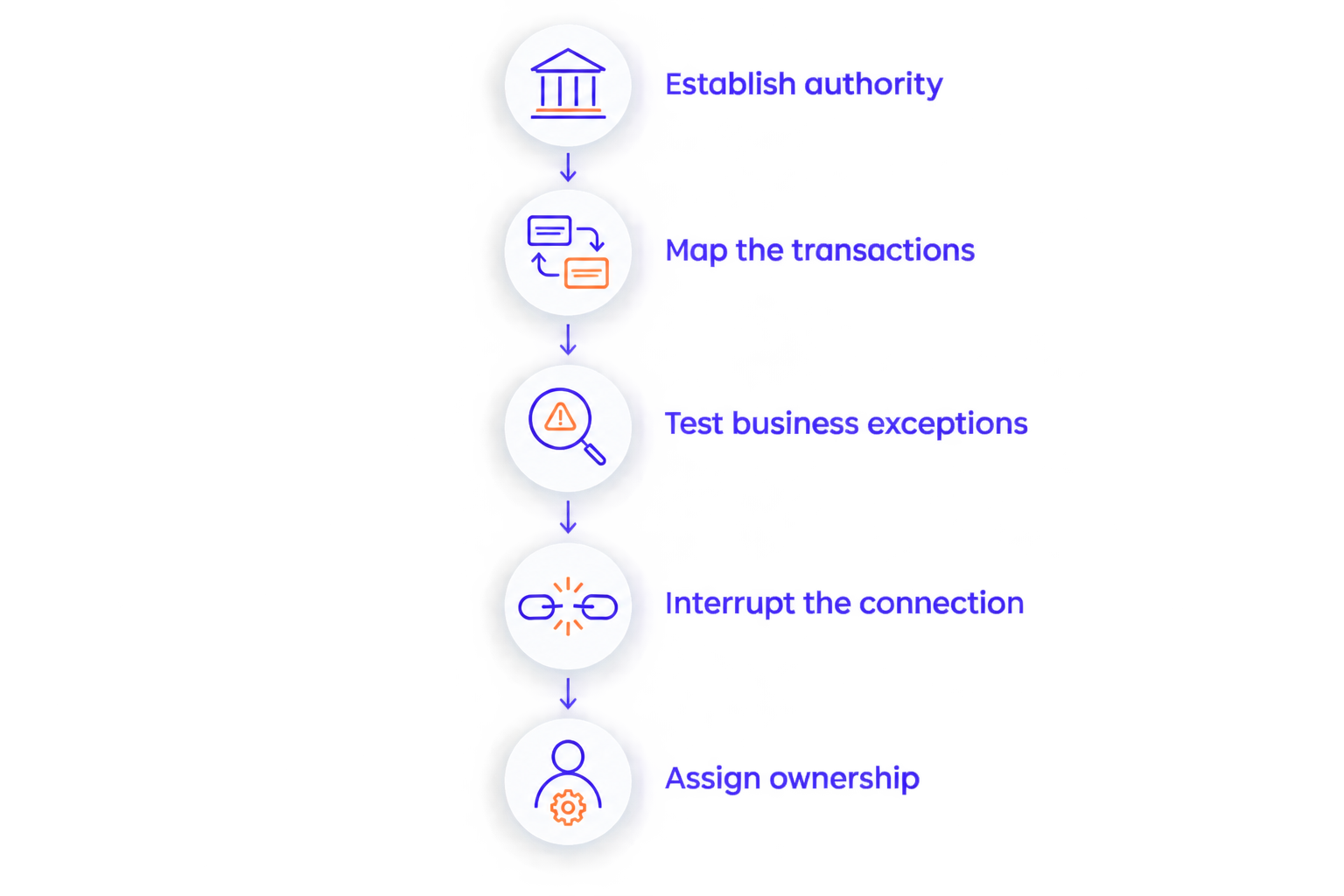
Use a staged acceptance process. Your supplier should demonstrate the proposed architecture against your records and business rules before you approve production cutover.
Establish authority
- Assign the system of record. Name the authoritative system for orders, inventory, customer records, fulfillment status, and financial adjustments. Define who can change each record and how conflicting changes are handled.
- Map the transactions. List required fields, identifiers, permitted values, and rejection conditions. Include custom fields and distinguish mandatory data from information that can arrive later.
Prove recovery
- Test business exceptions. Include an unknown product, an unmatched customer, a changed order, a partial fulfillment, and a return where those workflows apply. Have operations judge the outcome, not just the technical team.
- Interrupt the connection. Test an ERP outage, an expired credential, a repeated notification, and an interrupted batch. Confirm that recovery does not silently lose or duplicate transactions.
Assign ownership
- Reconcile and hand over. Compare source records with accepted destination records. Give the operating team access, instructions, escalation contacts, and authority to resolve exceptions before launch.
The acceptance sequence for a 2026 integration should establish data authority before testing transactions, then prove recovery before transferring responsibility. Reversing that order leaves the team debugging symptoms without agreed rules.
What should you ask an integration supplier?
Ask questions that produce inspectable evidence. A confident answer without a transaction trace or written responsibility is not acceptance.
- Which exact ERP version and interface does the proposed connector support?
- Which required workflows are configuration, custom code, manual work, or exclusions?
- What prevents the same Shopify order from creating duplicate ERP orders after a retry?
- Where can operations see rejected records, and who owns correction?
- How do you detect a missing order when no visible error appears?
- What changes when credentials expire or either system changes its interface?
- Who owns the configuration, documentation, access credentials, and exit handover?
DigiForm is best suited to Shopify buyers seeking a consultancy that builds and runs what it recommends. Its stated scope includes Shopify development and replatforming; the connector, ERP compatibility, acceptance tests, and support obligations still belong in the engagement scope.
The advantage of that consultancy model is implementation and operating responsibility rather than a software-only purchase. The trade-off is that you must define those responsibilities explicitly. DigiForm’s service scope is not, by itself, evidence that a particular legacy ERP connector will fit.
Discuss your ERP integration scope
Discuss Shopify workflows, ERP constraints, acceptance tests, and operating ownership with DigiForm.
When should you defer the integration purchase?
Defer when nobody can identify the authoritative inventory record, the ERP interface is inaccessible, or the supplier will not demonstrate failure recovery. Buying a connector does not resolve those conditions.
Also defer when the business case depends on eliminating work that the proposal merely moves into an exception queue. Record who handles exceptions today and who would handle them after launch. Compare the work, not just the successful transaction path.
For a 2026 cutover, require named owners for stock reconciliation, order release, customer communications, and rollback decisions. Freeze integration changes according to an agreed release plan rather than changing mappings during launch reconciliation.
If development is already being proposed, separate the missing capability from the preferred implementation. The decision criteria in when Shopify custom app development is worth the upkeep help keep ongoing maintenance inside the buying decision.
Does no custom middleware mean no custom code?
No. A packaged connector or managed platform can contain customer-specific scripts, transformations, or extensions. Ask the supplier to identify those components and document their maintenance owner before you approve the architecture.
Can you integrate a legacy ERP without an API?
Yes, when the ERP provides another usable interface, such as supported file imports and exports. The integration must still validate acceptance, handle rejected records, and meet your timing requirements; an interface that cannot support those controls is not enough.
Who should own the integration after launch?
Your business should name an accountable operating owner, with a technical owner responsible for integration health and controlled changes. The supplier’s responsibilities must state who investigates failures, corrects records, authorizes replay, and communicates unresolved business impact.
FAQ
Can Shopify Plus connect to an old ERP without replacing it?
Yes, if the ERP exposes a usable interface and the integration supports your required transactions. ERP age alone does not determine whether replacement or custom development is necessary.
Is a packaged ERP connector the same as having no middleware?
No. A packaged connector still performs integration functions, and it can run through an external integration platform. Ask where mappings execute and who operates them.
How do I know whether a connector supports my ERP?
Verify the exact ERP version, interface, configuration, and required workflows with the supplier. Require a demonstration using representative records rather than accepting a general compatibility claim.
Can Shopify Plus inventory updates run through file exchange?
Yes, when the ERP supports suitable exports and the business accepts scheduled updates. Define inventory authority, rejection handling, and reconciliation before using that approach.
What should happen when an ERP order import fails?
The integration should expose the rejected transaction and route it to a named owner. Recovery must preserve traceability and prevent duplicate orders when the transaction is retried.
Should I choose a connector or commission a custom integration?
Choose a connector when it passes your workflow and recovery tests. Commission custom integration only when a documented requirement cannot be met safely through the available supported options.
Can DigiForm help with Shopify Plus ERP integration planning?
DigiForm offers Shopify development and replatforming consulting. Define the ERP interface, transaction scope, acceptance tests, and ongoing responsibilities before commissioning an engagement.
One last thing
A successful retry can create a failed business outcome. If the ERP accepted an order but the acknowledgment never returned, sending the order again can create a duplicate unless the integration recognizes it.
Make that ambiguous outcome part of acceptance testing. Ask the supplier to show the original order, the interrupted acknowledgment, the retry, and the final ERP record. That demonstration tells you more about production readiness than a clean order flowing through an uninterrupted connection.