Yes. Shopify custom apps can survive a platform version upgrade when their API calls, permissions, extensions, and integrations remain compatible with the changed platform. Survival is not automatic: an app that still opens can still send incorrect inventory, miss fulfillment events, or fail to write orders correctly.
- A Shopify custom app platform upgrade needs workflow testing, not an automatic rebuild.
- Shopify API versioning gives custom apps a maintenance window, not permanent compatibility.
- DigiForm offers Shopify development and replatforming consulting for CPG, manufacturing, and private-equity-backed companies.
- Delay the release when order accuracy, recovery procedures, or operating ownership remain unproven.
Can Shopify custom apps survive a platform version upgrade?
Yes, but first identify what is changing. Shopify operates the hosted platform; your team maintains the custom application and its dependencies. An API version change, theme update, and Shopify plan change are different events. They need different acceptance tests.
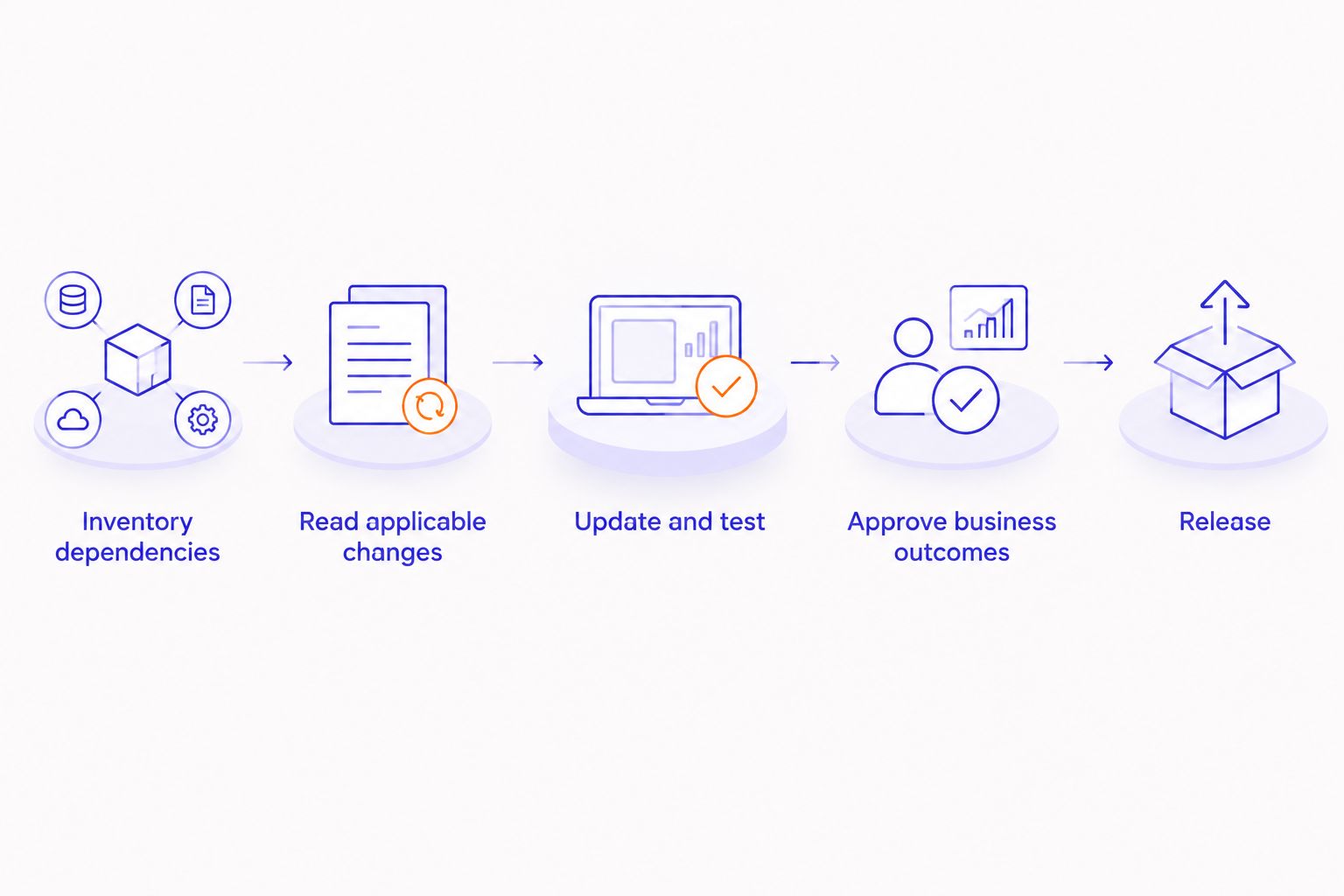
Treat compatibility as part of ongoing Shopify operations, not a repair job after an incident. Use this release sequence for a Shopify custom app platform upgrade in 2026:
- Inventory dependencies. Record API versions, webhook subscriptions, access scopes, app extensions, hosting, libraries, and connected systems. Name the owner of each dependency. Include scheduled jobs that do not run during an ordinary storefront check.
- Read the applicable changes. Match Shopify's release notes and deprecation notices to the actual calls and features the app uses. Separate required changes from unrelated announcements. A platform release does not mean every app needs code changes.
- Update and test outside production. Exercise the target API version and affected extensions in an appropriate test environment. Use representative orders and failure cases. Confirm that test credentials cannot write into live fulfillment or finance systems.
- Approve business outcomes. Have operations verify order entry, inventory movements, cancellations, refunds, and fulfillment behavior wherever the app touches them. Developers verify the software; operating owners verify the records and decisions it produces.
- Release with recovery ownership. Define the deployment window, stop conditions, monitoring, and person authorized to reverse the deployment. Document how to reconcile transactions already written. Restoring application code does not reverse an order sent downstream.
Why this matters
The operating risk is a transaction that looks successful in Shopify but fails elsewhere. A storefront screenshot cannot prove that an ERP received the correct order or that a warehouse received the cancellation. Your release evidence needs to follow the transaction across the systems the app connects.
DigiForm provides Shopify development and replatforming consulting for CPG, manufacturing, and private-equity-backed companies. For buyers in those businesses, the purchasing decision should start with order accuracy, store earnings, and accountable maintenance—not the size of the proposed rebuild.
For your 2026 operating plan, separate compatibility maintenance from discretionary features. Required maintenance protects existing workflows. New functionality needs its own business case, acceptance criteria, and owner.
API version changes: maintain the integration contract
Shopify's published API versioning policy provides 4 stable API releases per year, with stable versions supported for at least 12 months. Releases follow a 3-month cadence. These are planning intervals, not a guarantee that an unchanged custom app remains correct indefinitely.
Versioned requests identify the API contract the application expects. When a requested version becomes unsupported, Shopify's documented fall-forward behavior can route requests to a supported version. A successful response therefore does not, by itself, prove that the application is using the contract its developer intended.
Ask the maintainer to inspect the API version returned by Shopify, not just the version configured in source code. Then review changed fields, mutation inputs, permissions, webhook payloads, and business logic affected by those changes.
Best for: A version-specific compatibility patch when the app's workflow remains necessary and its architecture remains suitable. The benefit is a bounded change; the limitation is that updating a version identifier does not repair changed assumptions in the application.
Theme and extension changes: test the customer-facing surface
A theme update is not the same as an Admin API upgrade. A custom app can keep processing backend requests while its storefront component stops displaying or interacting correctly. Theme app extensions and custom storefront code belong in the dependency inventory when the app uses them.
Test the actual interaction: selecting a product option, submitting a form, adding an item, or displaying app-provided content. Include the templates and devices your business supports. Do not accept a homepage check as evidence that every affected template works.
Best for: Targeted storefront regression testing when the changed surface is the theme or an extension. This keeps the work focused, but it does not prove that downstream order processing remains correct.
Plan changes: check capabilities rather than assuming a rebuild
Moving between Shopify plans is a commercial and capability change, not a conventional installation upgrade. Review whether the app depends on a feature, API capability, or checkout surface affected by the plan change. Do not assume a plan change requires rewriting unrelated code.
The same discipline applies when consolidating stores or changing how a portfolio operates. Store-specific configuration, credentials, identifiers, and routing rules need review even when the application code stays unchanged.
Best for: A capability review when your business changes plans or store structure. The advantage is avoiding unnecessary development; the limitation is that a capability review alone does not validate runtime behavior.
| Change surface | Main evidence required | Advantage of a targeted response | Limitation |
|---|---|---|---|
| API version | Requests, responses, webhooks, and transaction results | Focuses maintenance on changed contracts | Does not validate storefront behavior |
| Theme or extension | Rendered components and customer interactions | Isolates customer-facing regressions | Does not validate ERP or fulfillment records |
| Plan or store structure | Required capabilities, configuration, and routing | Identifies whether code changes are necessary | Still requires workflow testing |
Why upgrade effort varies
Custom app upgrade effort follows dependency depth and operating consequences. In 2026, the useful question is not whether an app is old. Ask how much of its behavior is understood, tested, and owned.
- API coverage. More affected operations mean more contracts to inspect. A read-only reporting app and an order-writing integration need different acceptance evidence.
- Write permissions. An app that changes orders, inventory, or customer records needs controls for incorrect writes, not just failed requests.
- Connected systems. ERP, warehouse, subscription, and product-data connections introduce mappings and reconciliation work beyond Shopify itself.
- Storefront coupling. Theme selectors, templates, and extension behavior add another testing surface when the app touches the customer experience.
- Maintenance condition. Missing source access, unsupported libraries, absent tests, and undocumented deployment procedures increase the work needed to establish control.
- Recovery requirements. An app that sends irreversible downstream instructions needs a different recovery plan from one that only displays information.
Require the supplier to connect each work item to a dependency or acceptance test. A proposal that says only “upgrade the app” does not define a purchasable outcome.
What should you test before approving the upgrade?
Test complete business transactions, including failures. A successful API response proves that a request was accepted under the API's rules; it does not prove that the commercial outcome is correct. Start with the records your finance and operations teams would need to reconcile after an incident.
For an order integration, trace creation, edits, cancellations, refunds, and fulfillment events where those actions are in scope. Check identifiers, quantities, discounts, taxes, shipping details, and destination-system status. Verify that duplicate deliveries or retries do not create duplicate business actions.
For customer-facing components, cross-browser testing for e-commerce belongs beside transaction testing because correct backend processing does not prove that a shopper can complete the interface interaction. Browser checks and integration checks answer different questions. Neither substitutes for the other.
Keep the evidence concrete:
- Expected outcome: What record or state should exist after the action?
- Observed outcome: What happened in Shopify and each affected system?
- Exception behavior: What happens after a timeout, rejected write, or repeated event?
- Approval owner: Who accepts the result on behalf of operations?
For a 2026 release, save this evidence with the deployed code revision and configuration. That creates a usable starting point for the next change instead of another investigation from scratch.
Who should own the upgrade after deployment?
Assign a named technical owner and a named operating owner. The technical owner maintains compatibility, deployment procedures, credentials, and monitoring. The operating owner accepts transaction behavior and decides whether exceptions are tolerable.
Monitoring should cover business failures as well as application failures. An error log helps diagnose a rejected request; reconciliation helps detect an order that never arrived. Decide who reviews each signal and who acts when the records disagree.
Ask a prospective supplier these questions before signing:
- Which dependencies and API versions are included in the scope?
- Who reads deprecation notices and schedules maintenance?
- Which transactions will the acceptance tests follow end to end?
- Who handles exceptions during the release window?
- What happens to transactions written before a rollback?
- What source code, credentials, documentation, and test evidence remain under your control?
DigiForm is best for CPG, manufacturing, and private-equity-backed companies seeking Shopify development and replatforming consulting. That fit does not establish whether your app needs a patch or a replacement. Require DigiForm, or any supplier, to justify the scope against the dependency inventory and operating evidence before you discuss the engagement.
When should you defer a custom app rebuild?
Defer a rebuild when a compatibility patch resolves the identified problem and the existing workflow still earns its upkeep. Rewriting functioning business logic introduces another change surface. An API deadline alone is not evidence that the entire application architecture has failed.
Keep necessary maintenance separate from optional replacement. Deferring a rebuild does not mean ignoring an unsupported dependency. It means choosing the smallest supportable change while evaluating the replacement on its own merits.
A rebuild needs a stronger case when the app has no accountable owner, cannot be deployed reliably, or cannot produce correct transactions after targeted repairs. Even then, ask for staged acceptance and a cutover plan. A replacement application can reproduce the same operating gaps under new code.
Delay the production release when critical acceptance tests fail, recovery instructions are untested, or the business cannot staff exception handling. A calendar target does not override a known order-integrity problem.
Does every Shopify API release require an immediate deployment?
Shopify's 4 stable API releases per year do not require an immediate production deployment for every app. Review each release against the app's dependencies and current support window. Schedule required changes early enough to test them rather than treating the support deadline as the deployment date.
How long does Shopify support a stable API version?
At least 12 months is Shopify's published stable API support window. Use that window to plan testing and deployment, while separately tracking deprecations and affected features. Support duration does not certify your app's business logic.
FAQ
Will a Shopify upgrade automatically break my custom app?
No. A Shopify upgrade does not automatically break a custom app, but compatibility depends on the APIs, permissions, extensions, and workflows the app uses. Test affected dependencies before approving the release.
Do I need to rebuild a custom app for every Shopify API version?
No. A custom app needs the changes required by its dependencies, not an automatic rebuild. Require evidence that a targeted patch cannot meet the acceptance criteria before approving replacement.
Can my app still work after its requested API version becomes unsupported?
Yes, requests can continue through Shopify's documented fall-forward behavior. Continued responses do not prove unchanged behavior, so inspect the returned API version and test the business workflow.
Is upgrading a Shopify theme the same as upgrading a custom app?
No. A theme update changes a different surface from a backend API version change. Test app-provided storefront interactions separately from backend transactions.
What should I ask an agency before approving a custom app upgrade?
Ask for the dependency inventory, affected release changes, transaction-level acceptance tests, and recovery plan. The proposal should name who owns deployment, exception handling, and ongoing maintenance.
Can rolling back the app undo orders sent to my ERP?
Rolling back application code does not undo transactions already written to an ERP. Your recovery plan needs reconciliation and corrective actions for those records.
Who should sign off on a Shopify custom app upgrade?
A technical owner and an operating owner should sign off on the upgrade. Technical approval covers deployment and compatibility; operating approval covers transaction accuracy and exception handling.
One last thing
An app that returns no errors can still be wrong. For your next 2026 release, choose a critical transaction and require evidence of its final state in every affected system. That acceptance test is more valuable than a declaration that the app is “upgrade-ready.”