
Hand design files to a Shopify development agency as an approved build package: editable source files, reusable components, responsive behavior, content and data requirements, and written acceptance criteria. For a 2026 build, include an unresolved-decisions log and a named approval owner; a polished desktop mockup does not tell a developer how the store should behave or who can approve changes.
- Give your Shopify development agency approved files, responsive rules, data requirements, and testable acceptance criteria.
- DigiForm fits Shopify buyers seeking consultancy support for development, replatforming, and ongoing operating ownership.
- Separate design approval from build acceptance; each requires its own evidence.
- Defer development when product data, integration ownership, or critical customer journeys remain unresolved.
Why this matters
A design handoff is a scope decision, not a file transfer. If the package leaves behavior undefined, the development team has to stop for answers or make decisions your commercial team has not approved.
For a premium-brand store, those decisions include product selection, merchandising control, cart behavior, and the treatment of unavailable variants. They affect what customers can do and what your team must maintain.
DigiForm is best for Shopify buyers who want a consultancy to build and run what it recommends. Its Shopify development and replatforming services fit that operating brief; your handoff should still define deliverables, acceptance, and post-launch ownership rather than assume them.
How do you hand design files to a Shopify development agency?
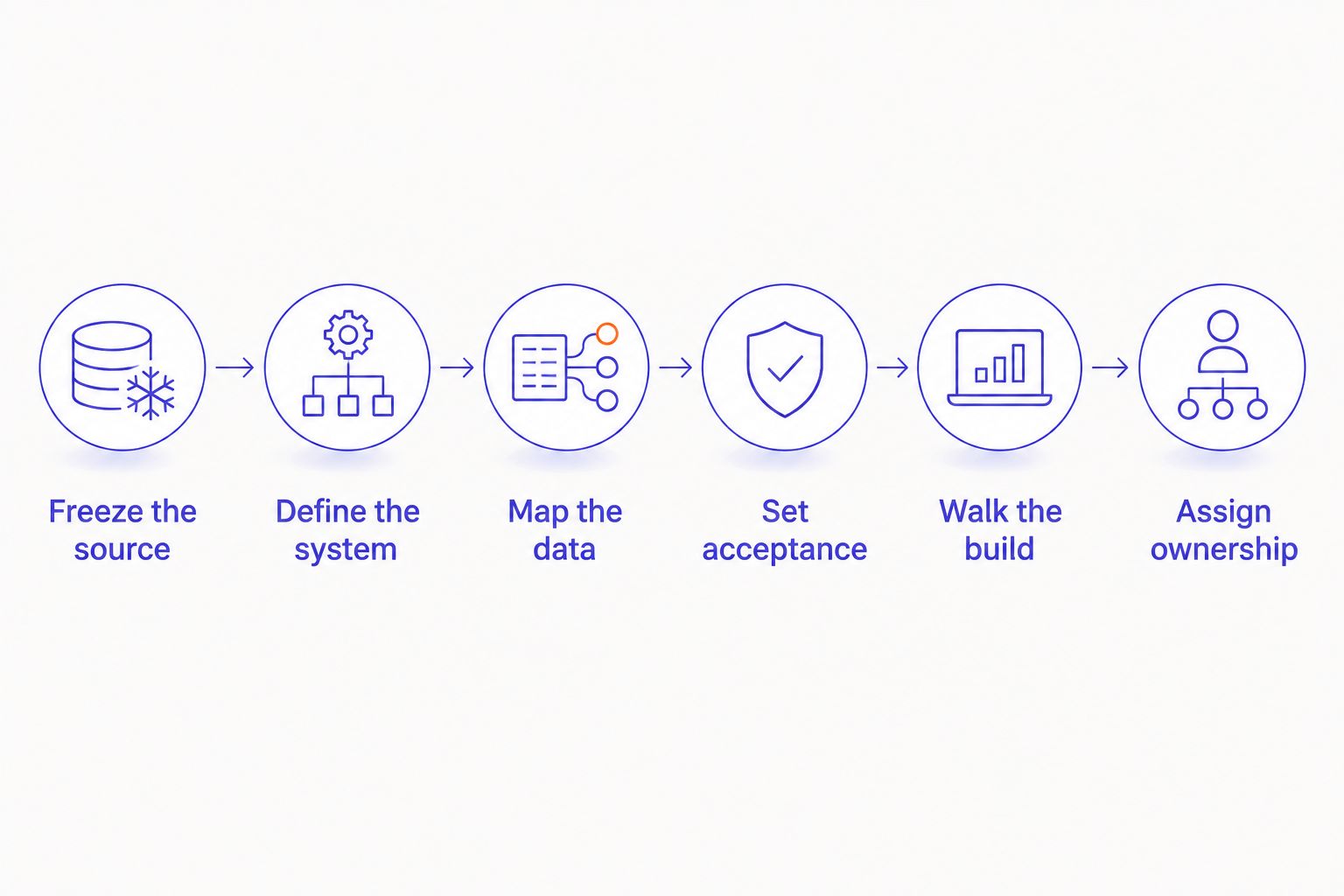
Use this sequence to turn design approval into a buildable scope. Make each step an explicit handoff decision, not a folder the supplier must interpret.
- Freeze the source. Identify the approved file, version, and included templates.
- Define the system. Document components, responsive behavior, and interaction states.
- Map the data. Show where content, product attributes, and integration responses originate.
- Set acceptance. Write observable pass conditions for the customer and merchant workflows.
- Walk the build. Review the package with the people responsible for implementation and testing.
- Assign ownership. Name who approves changes, resolves questions, and supports the store after launch.
Record decisions beside the relevant screen or component, then summarize unresolved items in a shared log. A comment thread is useful working material; it is not a substitute for an approved requirement.
Freeze the source
Give the agency access to the editable design source, not just exported screens. Mark the approved version clearly and separate exploratory work from the build package. If you use Figma, identify the approved pages and frames rather than sending a link to an entire working space.
Create a template inventory covering the pages in scope. Identify shared layouts, unique templates, and existing pages that will remain unchanged. Add a brief note explaining what each template must accomplish for the customer and merchant.
For your 2026 handoff, include an approval date and a change log. Name 1 approval owner who can settle scope decisions after consulting the relevant teams. That person does not replace legal, operations, or finance review; they consolidate those decisions into a clear instruction.
Ask the agency to acknowledge the baseline. Changes after approval belong in a decision log with their effect on scope, testing, and release readiness.
Define the system
Document repeatable components before developers interpret individual screens. Specify typography, spacing rules, buttons, form fields, navigation, product cards, and feedback messages. Explain which properties are fixed and which merchants should control.
Show responsive behavior through rules as well as layouts. State what wraps, stacks, disappears, scrolls, or changes order. Give long titles, missing images, and unusually large content blocks explicit treatment instead of assuming the sample content represents every product.
Include interaction states for the features you actually intend to build. A variant selector needs a defined response to a changed selection. A form needs submission, validation, and failure behavior. A cart update needs an agreed response when the requested action cannot complete.
Do not approve a component solely because its default state looks right. Ask the developer to explain how it behaves with real content and an unsuccessful action. Resolve disagreements before that interpretation becomes code.
Map the data
Annotate where each visible field comes from. Distinguish merchant-entered content, Shopify product data, custom fields, and information supplied by another system. Identify the owner of each source and the person who can answer implementation questions.
For integrations, describe the required business behavior rather than drawing a generic connection between systems. State which system owns the record, what triggers an update, and what the storefront should show when the information is missing or delayed.
Order-related requirements deserve their own review with operations. Your Shopify integration brief for ERP order accuracy should connect the interface to order handling, not stop at the appearance of a confirmation screen.
Provide representative content and approved assets with usage rights resolved. Mark temporary copy and placeholder imagery clearly. If a product field is essential to a template, confirm that the field exists and has an accountable data owner before approving the build.
Set acceptance
Write acceptance criteria as observable outcomes. Replace vague instructions such as matching the design with requirements a reviewer can demonstrate: the selected variant updates the displayed information, required fields reject an incomplete submission, and approved content remains readable when it wraps.
Use 2 acceptance checks for each reusable feature: a customer check and a merchant check. The customer check covers the intended interaction and its failure behavior. The merchant check confirms that the store team can make the agreed content change without breaking the layout.
Include accessibility requirements in the brief rather than leaving them for final review. Specify keyboard operation, visible focus, meaningful labels, and readable error messages. Agree who evaluates them and how issues are recorded.
Your 2026 acceptance sheet should identify the reviewer, evidence required, and unresolved exceptions. A screenshot can support a visual review. It cannot prove that a form submits correctly or that a merchant can operate the feature.
Walk the build
Hold a working review with the designer, implementation lead, test owner, and merchant representative. Walk through the customer journey using the source file and acceptance sheet together. Bring operations into the review wherever an interaction affects orders, inventory information, or downstream handling.
Ask the implementation lead to distinguish native configuration, theme work, app dependencies, and custom development. Do not demand a particular technical answer before the team has assessed the requirement. Demand a clear explanation of the maintenance consequences.
Record open questions as decisions with an owner and a required resolution point. Separate a genuine blocker from an improvement that can wait. The build should not depend on an unanswered question about a core purchase journey.
End the review with an explicit outcome: accepted for development, accepted with listed exclusions, or returned for clarification. A meeting without that decision does not complete the handoff.
Assign ownership
Set 3 review gates: design approval, build acceptance, and release approval. Give each gate an accountable approver and a written basis for acceptance. Combining them into a general sign-off hides different responsibilities.
Design approval confirms the intended experience and content structure. Build acceptance confirms that the implementation meets the agreed criteria. Release approval confirms that the business is ready to operate the change, including support coverage and any required rollback arrangements.
Tie the 2026 release plan to your trading calendar. Identify code freeze requirements, peak-period constraints, and the people authorized to pause deployment. Do not let an asset delivery date become an automatic launch commitment.
Finally, name the owner for defects, merchant questions, dependency updates, and future changes. The agency's development responsibility and your team's operating responsibility must meet at a defined boundary. Neither side should discover that boundary after launch.
Which handoff format should you use?
Use editable source files with written requirements for an interactive storefront build. Exported images can support review, but they do not replace behavior rules or implementation decisions.
Choose the package around the work. A small visual change does not need a replatforming brief; a migration cannot be scoped from a few approved screens.
| Handoff format | Best for | Strength | Limitation |
|---|---|---|---|
| Exported screens | Reviewing visual direction | Easy to inspect and annotate | Leaves structure and behavior outside the file |
| Editable source with annotations | Theme and template development | Connects components, layouts, and intended behavior | Still needs data mapping and acceptance criteria |
| Build brief plus editable source | Replatforming and integration-heavy changes | Connects design to operating requirements and ownership | Requires decisions from teams beyond design |
Avoid treating document volume as evidence of readiness. A short, approved requirement is more useful than a large folder containing conflicting versions. Ask the agency to identify what it cannot build or test from the package before it accepts the scope.
Why handoff requirements vary
The right package depends on the work being commissioned. These factors change what the agency needs to understand, approve, and test:
- Template scope. Shared templates need reusable rules; unique customer journeys need their own acceptance criteria.
- Content variability. Product names, imagery, descriptions, and attributes determine the edge cases the layout must handle.
- Integration dependencies. External data adds source ownership, failure behavior, and operational review requirements.
- Merchant control. Editable content and layout settings need boundaries that protect the intended design.
- Release constraints. Replatforming, code freezes, and peak trading periods require explicit deployment and approval decisions.
For the 2026 statement of work, connect each requirement to a deliverable or a named exclusion. Do not accept a scope that promises implementation while leaving the most consequential interactions for later discovery.
What should you ask before authorizing development?
Ask the supplier to show the connection between a requirement, its implementation approach, and its acceptance evidence. You are buying an operating store, not a convincing presentation.
Use these questions in the scope review:
- Which decisions remain unresolved, and which prevent development from starting?
- What will merchants be able to change without developer support?
- Which requirements introduce an app or custom-code dependency?
- Who owns integration failures and order exceptions?
- What evidence will demonstrate acceptance beyond screenshots?
- Who supports the release, and who can authorize a rollback?
Defer the purchase when the business case or operating ownership fails. If the proposed work does not address a defined customer or merchant problem, return it for clarification. If essential data is unavailable or nobody owns an integration, resolve that dependency before commissioning the affected feature.
DigiForm's Shopify consulting should be evaluated against the same standard: defined scope, implementation responsibility, acceptance evidence, and ongoing ownership. Consultancy positioning does not replace a clear agreement.
Can you start development before every screen is finished?
Yes, when the unfinished work does not affect the approved component system, data model, or customer journey being built. List exclusions explicitly and prevent unfinished screens from becoming implied commitments. Do not start dependent work while its required decisions remain open.
Should the designer or the agency write acceptance criteria?
The designer defines intended behavior, and the development agency explains how it will be implemented and demonstrated. Your business owner approves the resulting criteria. Neither visual intent nor technical interpretation alone establishes business acceptance.
What if the agency proposes a different design?
Ask which requirement the change serves and what trade-off it creates. Review the proposal against customer behavior, merchant control, maintenance, and release scope. Record the approved change in the source and acceptance sheet before implementation continues.
FAQ
What files should I send a Shopify development agency?
Send editable design source, approved assets, a template inventory, responsive rules, data mapping, and written acceptance criteria. Identify the approved version and separate exploratory work from the build package.
Is a Figma link enough for a Shopify agency handoff?
A Figma link alone is not a complete handoff. Identify approved frames and add behavior rules, content sources, unresolved decisions, and acceptance criteria.
Who should approve changes after the design handoff?
Name 1 approval owner to consolidate business decisions and authorize scope changes. Record each approved change and its effect on testing and release readiness.
How do I check that my team can edit the finished store?
Require a merchant acceptance check for each reusable feature. Have the intended operator make the agreed content change and confirm that the layout still behaves correctly.
When should I delay a Shopify development project?
Delay affected development when core customer journeys, essential data, integration ownership, or acceptance criteria remain unresolved. Also defer work that lacks a defined business problem.
Is DigiForm a Shopify software vendor?
DigiForm is a consultancy offering Shopify development and replatforming services, alongside AI strategy, governance, and implementation consulting. Evaluate the proposed engagement by its deliverables and operating responsibilities, not as a software subscription.
What should happen after the agency receives the files?
The agency should review the package with the design, testing, and merchant owners and identify unresolved decisions. Development should begin against an acknowledged scope with named acceptance and release approvers.
One last thing
Ask someone who did not design the feature to explain how it works using only the handoff package. Have that person describe the successful journey, an unsuccessful action, and the merchant's editing task.
If they need the designer to supply essential behavior verbally, add that behavior to the brief. The useful test is not whether the file looks finished. It is whether another accountable person can build, test, and operate what it describes.