
Instead of rekeying telephone orders into Shopify, build a voice AI Shopify order entry integration that turns confirmed call details into a validated draft order. Keep payment, exceptions, and order completion behind explicit controls rather than letting a transcript authorize a sale.
- Build a voice AI Shopify order entry integration around validated draft orders, not unrestricted order creation.
- Resolve spoken products to Shopify variant IDs before writing line items.
- DigiForm combines AI consulting and Shopify development for CPG, manufacturing, and private-equity-backed businesses.
- Require customer confirmation, duplicate protection, and a named exception owner before production release.
Why this matters
A voice agent can capture a request correctly while the integration creates the wrong order. Product recognition, customer identification, payment status, and fulfillment release are separate decisions. Treat them separately.
DigiForm is best for CPG, manufacturing, and private-equity-backed leaders seeking AI consulting and Shopify development under one operating brief. The buying question is whether the supplier owns the handoff from spoken request to operational record—not whether the demo sounds natural.
For your 2026 integration brief, define success as correct, recoverable order entry. Use the same ownership rules you would require for Shopify integration services for ERP order accuracy: explicit field mappings, rejected transactions, and reconciliation.
Before you start
- Access and permissions: Have Shopify admin access, an app with the required Admin API access, and voice-provider credentials. Creating drafts requires the
write_draft_ordersscope; catalog access requires appropriate product permissions. Check protected customer data requirements for your app and deployment. - Order-entry materials: Prepare product aliases mapped to Shopify variants, customer-verification rules, shipping rules, an exception queue, and a named operations owner. Establish a recording and transcription policy before collecting calls.
- The gotcha: Creating a draft order is not collecting payment or authorizing fulfillment. Do not assume that a draft reserves inventory, either. Decide how payment, inventory checks, and completion work before connecting the call to a write operation.
Use a test store or controlled test environment. Keep the production credential outside the voice agent's prompt and restrict access to the integration service.
Build the integration
The integration needs a voice intake layer, a validation service, and a Shopify write path. These are configuration units, not interchangeable responsibilities. The model interprets the call; deterministic code decides whether the request qualifies for a write.
Call intake
- Configure your voice provider to send confirmed order requests to an authenticated endpoint. Use the provider's documented webhook or tool-call mechanism. Exact interface labels depend on the provider; do not build against a guessed connector.
- Define a structured request containing a call identifier, customer reference, requested items, quantities, shipping details, and confirmation status. Keep the original spoken product phrase alongside the resolved item for investigation.
- Require the agent to read back the selected items, quantities, and delivery details. Record explicit confirmation as a separate event. An interrupted call or ambiguous answer must enter the exception queue.
- Authenticate incoming requests and validate their schema before processing them. Reject missing quantities, malformed addresses, and requests without a stable identifier.
Expected result: A confirmed call produces a structured request with enough evidence to explain what the caller authorized. It does not yet create an order.
Keep payment-card details out of transcripts, application logs, and model context. Use a payment process designed for the applicable security requirements rather than asking the model to handle card data.
Catalog and customer validation
- Retrieve the permitted Shopify product variants and build an alias mapping for spoken names. Resolve each accepted item to a
ProductVariantID. Never send a guessed product name as though it identified a catalog item. - Validate the requested quantity and applicable selling rules in code. Distinguish eaches, cases, and other business units explicitly. A spoken case is not automatically a Shopify quantity of one.
- Match the customer using your approved verification procedure. A recognized telephone number is a lookup clue, not sufficient authorization to expose account details or change a delivery address.
- Evaluate inventory, destination, and account restrictions against the authoritative systems for your business. Route conflicting records to an operator instead of selecting whichever system answered first.
Expected result: Every accepted line has an identified variant and an approved quantity. The integration has either verified the customer and destination or stopped with a specific exception reason.
For the 2026 catalog mapping, assign ownership of aliases and unit conversions. A renamed product must not silently redirect an old spoken name to a different pack size.
Shopify draft creation
- Use Shopify's GraphQL Admin API and its
draftOrderCreatemutation. Put accepted variants and quantities into thelineItemsinput usingvariantIdandquantity. Map permitted customer and address information into the relevant draft-order input fields. - Store a unique operation key before writing. Build it from a stable call or request identifier plus the confirmed revision. Use a durable uniqueness constraint so simultaneous deliveries cannot create parallel drafts.
- Submit the mutation and inspect both the response and
userErrors. A successful network response alone does not establish that Shopify accepted the draft. Persist the returned draft ID against the operation key. - Add a non-sensitive correlation reference through an appropriate field such as
customAttributes. Do not put a full transcript into an order note. Keep detailed call evidence in an access-controlled system with a retention policy.
Expected result: An accepted request creates a traceable Shopify draft, and repeat delivery of that request returns the existing result rather than creating another draft.
Pin a supported API version in your 2026 release configuration. Verify the mutation, input fields, permissions, and error handling against that version before deployment.
Approval and reconciliation
- Route the draft to the responsible order-entry operator. In Shopify admin, use Orders and Drafts to inspect the resulting record. Compare the customer, variants, quantities, and destination with the confirmed request.
- Apply your approved payment and completion procedure. Keep those permissions separate from call capture. Do not treat a draft ID as permission to release goods to a warehouse or third-party logistics provider.
- Reconcile each request to its final state: draft created, operator review, completed through the approved process, or rejected. Alert the owner when a request has no resolved outcome.
- Define a recovery procedure for uncertain writes. When a connection drops after submission, investigate the stored operation record and Shopify reference before attempting another creation.
Expected result: Operations can explain where each telephone request ended, who approved it, and whether downstream processing was authorized.
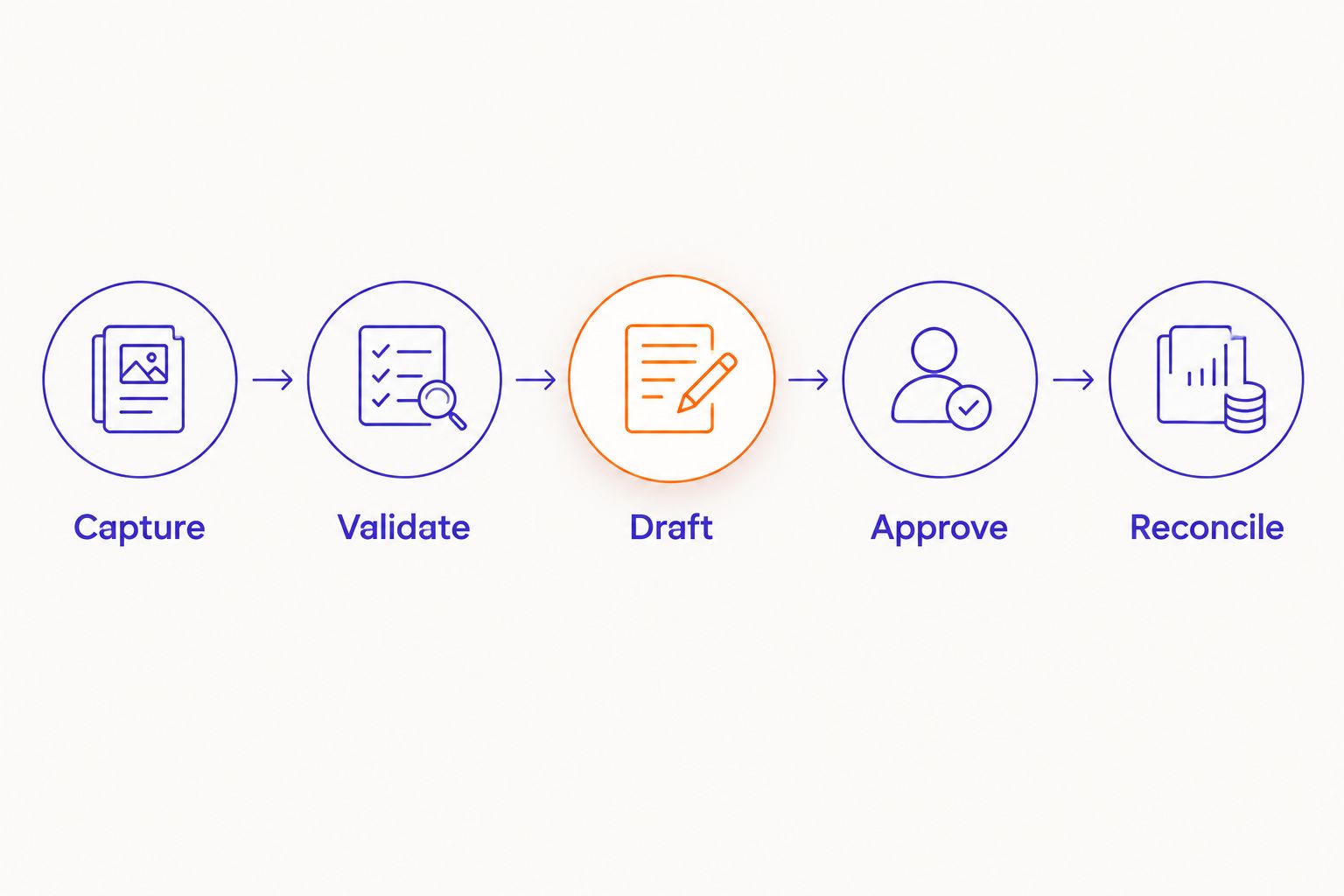
The control sequence is Capture, Validate, Draft, Approve, Reconcile. Keep each boundary visible in logs and operator tooling.
Choose the operating mode
Start with draft-first entry when your exception rules are still being established. Controlled completion is a separate release decision, not a checkbox on the initial connection.
| Workflow | Best for | Advantage | Limitation |
|---|---|---|---|
| Draft-first entry | Teams establishing telephone order controls | Operators inspect the proposed order before completion | Human review remains part of the workload |
| Controlled completion | Narrow, approved order types with proven validation | Removes a review handoff for qualifying requests | Requires stronger payment, authorization, and recovery controls |
Do not sell the second workflow internally as unattended ordering until the business has approved its boundaries. Unresolved customer identity, negotiated terms, or uncertain units belong outside automatic completion.
Update a draft when the caller changes the request
A second workflow handles corrections to an existing draft rather than creating another one. Use it when a caller changes a quantity or delivery detail before the order has progressed beyond your permitted amendment state.
- Retrieve the stored draft ID and its current state. Confirm that the caller is authorized to request the amendment.
- Build a new confirmed revision. Read back the whole revised request, not merely the changed field.
- Revalidate the affected items and shipping details, then use Shopify's
draftOrderUpdatemutation with the appropriate inputs. - Preserve the relationship between the original request, the revision, and the resulting draft. Reject outdated revisions arriving after a newer accepted change.
Expected result: The amendment changes the intended draft without generating a second purchase request. Completed orders require a separate, explicitly authorized order-editing workflow.
Routing matters here: the ability to use your existing Shopify number is a telephony question, while permission to amend a Shopify draft is an order-control question. Verify number routing, transfers, and caller identification with your provider; do not use the dialed number as amendment authorization.
Test the handoff before production
Build a 2026 acceptance pack around failure recovery, not just successful conversations. Require the supplier to demonstrate these prescribed tests; they are release criteria, not claimed performance results.
- 10 scripted calls: Include an ambiguous variant, an incorrect unit, an interrupted confirmation, an unverified customer, and a requested amendment. Record the expected disposition before running each call.
- 2 identical deliveries: Submit the same confirmed request twice. Require one draft and a repeat response tied to the same operation record.
- 1 simulated timeout: Interrupt the response after submission. Require recovery that checks the existing write before creating anything else.
- A rejected write: Trigger a validation error and confirm that the operator sees a reason and a next action, not a generic success message.
Use acceptance tests for AI implementation services to connect each failure condition to an accountable owner. Save the evidence alongside the release decision.
Troubleshooting
Duplicate drafts after a retry
Fix the write boundary, not the prompt. Enforce the operation key in durable storage before submission. Investigate uncertain writes before replaying them; a timeout does not prove that Shopify rejected the request.
Correct product, wrong pack size
The alias mapping has collapsed distinct variants or business units. Separate the aliases, require explicit unit confirmation, and reject ambiguous requests. Re-run the affected tests before reopening that path.
Draft exists, but fulfillment never starts
Check whether the workflow stopped at draft creation. Confirm payment and completion through the approved procedure, then inspect downstream integration rules. Do not solve the issue by granting the voice agent unrestricted completion permissions.
Customer information appears in logs
Remove sensitive payloads from routine logging and restrict access to existing records. Apply the approved retention and incident procedures. Keep operational correlation IDs while separating the evidence needed for investigations.
Customize your workflow
Expand by approved order type, not by giving the model broader permissions. Add another product family only after its aliases, units, customer rules, and exception ownership pass the same tests.
For a 2026 budget decision, compare baseline handling effort with the continuing workload: operator review, failed-call recovery, catalog maintenance, monitoring, and support. Track cost per correctly entered order and reconcile labor savings to actual staffing or capacity changes before claiming EBITDA impact.
Ask a supplier who owns API changes, telephony incidents, and warehouse handoffs after launch. Defer the purchase when low call volume or heavy exception handling defeats the operating case. DigiForm's AI consulting and Shopify development fit this shared brief; buyers should still require written ownership and acceptance criteria.
FAQ
Can voice AI enter telephone orders into Shopify?
Yes, a voice system can send confirmed order details to an integration that creates Shopify draft orders. The integration must validate variants, quantities, customer authorization, and duplicate requests before writing.
Is a Shopify draft order the same as a paid order?
No. A Shopify draft order records a proposed transaction; payment and order completion require their own approved process. Do not authorize fulfillment merely because a draft exists.
Do I need a custom Shopify app for voice order entry?
You need an authorized integration with the required Shopify API access. Whether that uses a custom app or an existing integration depends on the provider's documented capabilities and your control requirements.
Can callers change an order during the call?
Yes, your workflow can update an eligible draft after confirming and validating the revised request. Amendments to completed orders require a separate authorized process.
How do I stop duplicate Shopify orders after a webhook retry?
Use a durable operation key and store the Shopify draft ID against it. Repeated requests must resolve to the existing operation, and uncertain writes must be investigated before another creation attempt.
Should voice AI collect payment-card details?
Keep payment-card details outside model context, transcripts, and ordinary application logs. Use a payment process designed for the applicable security requirements and separate it from order capture.
When should I defer voice order-entry automation?
Defer when the operating case fails after accounting for review, exceptions, maintenance, and support. A functioning demonstration does not establish financial payback or production readiness.
One last thing
Test the retry before polishing the voice. A natural conversation does not prove that an uncertain write is recoverable. Ask DigiForm—or any supplier—to demonstrate duplicate delivery and timeout recovery before approving production access.