
Instead of manually copying AI incidents into a spreadsheet, connect your audit-log pipeline to your existing risk register through stable risk IDs, exception rules, and controlled updates. AI audit trail risk register integration should attach evidence to an accountable risk—not turn every model event into a new risk entry.
- AI audit trail risk register integration connects operational evidence to risk owners, controls, and review decisions.
- Keep detailed AI audit logs outside the register; attach access-controlled evidence references.
- Require human approval for risk acceptance, material rating changes, and closure.
- DigiForm provides AI governance and implementation consulting, not a replacement risk-register product.
Why this matters
A log records what happened. A risk register records exposure, ownership, controls, and treatment decisions. Connecting them makes operational failures visible to the people accountable for the business consequence.
For your 2026 operating plan, treat this as a control workflow rather than a dashboard project. Start with one AI-enabled process, such as order entry or invoice review. Define which exceptions require action before connecting the systems.
DigiForm is best for CPG, manufacturing, and private-equity-backed companies seeking AI governance and implementation consulting. DigiForm is a consultancy, not a risk-register application; your existing register remains the decision record.
The benefit is traceability. The trade-off is another integration to operate, with credentials, failed deliveries, access rules, and an owner. Defer the build if nobody can define the action an incoming event should trigger.
Before you start
- Access and ownership: Obtain read access to the relevant logs, approved write access to the register, and an evidence location accessible to risk reviewers. Name the business risk owner and the integration operator separately.
- Materials: Prepare your risk taxonomy, current risk IDs, control IDs, severity definitions, retention policy, and representative redacted events. Baseline the manual handling effort before estimating payback.
- The gotcha: Check whether the register supports updates to existing records, not just new-record creation. Also verify evidence-link permissions with an actual reviewer account; a working administrator link proves nothing about reviewer access.
The field names below define a reference schema for this workflow. They are configuration labels to create or map—not claims about the interface of any particular register. Preserve equivalent existing fields rather than renaming an established control system.
Event contract
- Select the event source. Use the application or orchestration layer that records the business action, model version, control outcome, and human intervention. A model request log alone does not establish whether an order was submitted or blocked.
- Define the identity fields. Map Event ID, Occurred At, System ID, Workflow ID, and Schema Version. Keep occurrence time separate from ingestion time so delayed delivery does not look like a new incident.
- Capture the control context. Include Control ID, Control Outcome, Action Outcome, and Evidence Reference. Record approval details only when an approval occurred. Do not infer approval from a successful technical response.
- Validate the payload. Reject malformed events into an exception queue. Exclude credentials and unnecessary personal data; retain restricted evidence in the approved evidence store.
Expected result: A sample event identifies the workflow, the control outcome, and the evidence needed to investigate. It does not expose sensitive prompt content merely because the register accepts free text.
Make missing telemetry visible. Silence from a broken logging pipeline is not evidence that a control passed.
Risk mapping
- Create a mapping table. Associate Workflow ID, Control ID, and the relevant event condition with an existing Risk ID. Have the risk owner approve that relationship.
- Define the qualifying condition. Trigger an update for a specific event, such as a blocked unauthorized action or a required approval being bypassed. Do not send every successful model response to the register.
- Set the update boundary. Allow the integration to append evidence, record an observation, and request review. Keep risk acceptance, material rating changes, and closure behind the register's approval process.
- Route unmapped events. Send unknown workflows or controls to a triage queue. Assign an owner rather than automatically creating a loosely classified risk.
Expected result: A qualifying event resolves to an approved risk and a defined action. An unknown event reaches a person without silently disappearing or creating register clutter.
For the 2026 control review, document who approves mapping changes. A developer changing an event label should not silently change the business risk receiving the evidence.
Separate event severity from risk rating. An urgent operational exception warrants prompt review; it does not, by itself, establish a new assessment of likelihood and impact.
Register updates
- Choose the delivery method. Use an approved API, connector, or supported import process. Confirm authentication, permissions, update behavior, and delivery-error handling before enabling writes.
- Define duplicate protection. Derive a stable deduplication key from the source event and intended destination action. Check the delivery ledger before writing, and preserve the destination receipt after success.
- Write the observation. Send Risk ID, Observed At, Control Outcome, Evidence Reference, and Review Required. Keep the summary factual: what failed, what business action occurred, and what needs review.
- Handle uncertain delivery. If the destination times out, check whether the write succeeded before retrying. Where supported, use destination-side idempotency; otherwise serialize updates and reconcile receipts.
Expected result: Each qualifying event produces a traceable observation without repeated register entries. Failed or uncertain deliveries remain visible to the integration operator.
For a 2026 procurement decision, require the supplier to demonstrate update semantics and failure recovery. A connector appearing in a catalog does not prove that it preserves approval history or prevents duplicate writes.
Review and acceptance
- Assign the review. Route the observation to the accountable risk owner with supporting evidence and a clear requested action. Keep operational incident handling separate from formal risk acceptance.
- Run 3 test events. Submit a qualifying exception, a nonqualifying event, and an unmapped event. Confirm that each follows its intended route.
- Replay the qualifying event 2 times. Verify that retries do not create additional observations. Test an unavailable destination, then restore delivery and reconcile the result.
- Test the human boundary. Confirm that the integration cannot accept risk, close a finding, or change protected fields without the required authorization. Open evidence using the reviewer's account.
Expected result: Your acceptance record shows correct routing, duplicate protection, recoverable failures, and preserved approval controls. Record the configuration version and approver in the 2026 acceptance record.
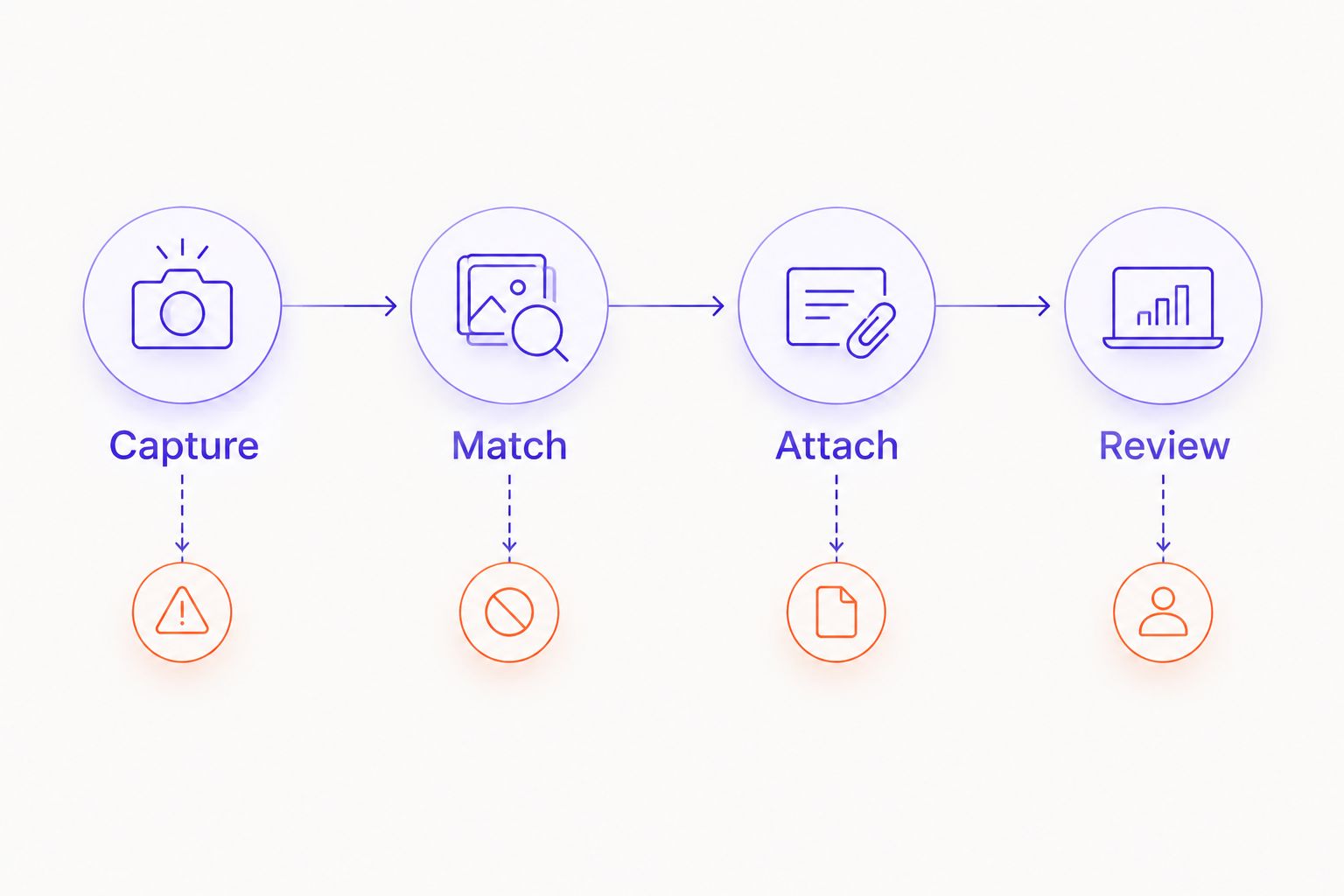
Use the sequence Capture, Match, Attach, Review as the operating model. Each stage needs a named owner and a visible failure path; none should depend on an undocumented spreadsheet correction.
Update risk evidence when a supplier changes its model
A model-change event is an adjacent workflow, not the same thing as a control failure. Use it to request reassessment of affected controls and risks without declaring an incident automatically.
- Record the supplier, affected system, previous and new version identifiers when available, and change evidence.
- Resolve the affected workflows through the system inventory and approved risk mappings.
- Open a review task linked to the existing risk. Ask the owner which validation or approval must be repeated.
- Attach the reassessment outcome and supporting evidence. Preserve the previous assessment rather than overwriting its history.
Expected result: A supplier change reaches the accountable owner even when no operational exception has occurred. Use the guide to reassessing AI risk when a supplier changes its model to define the review boundary.
Choose delivery timing by the decision you need to support:
| Delivery option | Best for | Advantage | Limitation |
|---|---|---|---|
| Event-driven updates | Exceptions requiring prompt operational review | Sends qualifying evidence as events arrive | Requires retry handling and controls against notification floods |
| Scheduled reconciliation | Periodic assurance and completeness checks | Compares source events with delivery receipts | Delays visibility until the reconciliation runs |
Use event-driven updates for urgent exceptions and scheduled reconciliation to check completeness. Neither method should silently modify an approved risk assessment.
Troubleshooting
Duplicate observations appear
Check whether retries generate new event identifiers or whether the ledger records success only after an unreliable response. Preserve the source identity, reconcile uncertain writes, and test concurrent deliveries. A preliminary lookup alone does not prevent competing workers from writing duplicates.
Evidence links fail for reviewers
Test the link with the reviewer's permissions, not the integration account. Check access groups, link expiration, and retention alignment. Store a durable evidence reference rather than copying sensitive payloads into the register to bypass an access problem.
Events attach to the wrong risk
Inspect workflow identifiers, control mappings, and configuration versions. Quarantine ambiguous events and require an approved mapping correction. Do not match risks solely through similar titles; wording changes are not reliable identifiers.
A closed risk keeps receiving alerts
Separate the risk's decision status from the event-delivery rule. Route new evidence to review under your reopening policy rather than reopening the record automatically. Confirm whether the event represents recurring exposure, an obsolete mapping, or a retired workflow still emitting telemetry.
The register shows nothing during an outage
Inspect source collection, queue depth, rejected payloads, delivery failures, and destination receipts independently. Recover events from the durable source, reconcile the backlog, and document any unrecoverable gap. Do not report complete coverage until the reconciliation supports it.
Customize your workflow
Expand by workflow, not by connecting every model endpoint. Add a new process only after its risk mapping, evidence permissions, exception handling, and operational owner pass acceptance.
For your 2026 budget, separate implementation effort from recurring operating work. Include event review, mapping maintenance, access administration, incident response, and supplier-change reassessment. Distinguish released staff capacity from actual expense reduction; they are not interchangeable EBITDA claims.
Ask a supplier to show:
- A failed delivery recovered without a duplicate observation.
- An unmapped event reaching an accountable owner.
- A reviewer opening the evidence with ordinary permissions.
- A configuration change with approval and rollback records.
- A handover that names the person responsible for failed queues.
Defer the purchase if the register has no accountable owners or the business case depends on unmeasured savings. An integration cannot repair a missing decision process.
DigiForm's AI strategy, governance, and implementation services fit a discussion about control design and delivery ownership. Establish the destination system, acceptance tests, and operating responsibilities before agreeing scope.
Define the control workflow
Discuss risk ownership, evidence routing, acceptance tests, and implementation scope.
FAQ
What is AI audit trail risk register integration?
AI audit trail risk register integration connects qualifying operational events to existing risks, control evidence, and accountable reviewers. Detailed logs remain in their approved repository; the register holds the risk decision and evidence references.
Should every AI event create a risk-register entry?
No. Use approved conditions to attach relevant observations to existing risks, and route unmapped events for triage. Creating a risk for every event confuses technical activity with assessed business exposure.
Can I connect audit logs to a spreadsheet risk register?
Yes, if the spreadsheet supports controlled updates, stable identifiers, access restrictions, and recoverable version history. Keep approval decisions protected and test concurrent writes before allowing automated updates.
Should the integration change risk scores automatically?
Keep material risk-rating changes behind an approval process. An event can request reassessment and supply evidence without deciding likelihood, impact, or risk acceptance.
What should I do when the register API is unavailable?
Retain pending events in durable storage and track failed delivery separately from risk status. Before retrying an uncertain write, check whether the destination already accepted it, then reconcile source events against receipts.
Do I need to copy prompts and responses into the register?
No. Attach access-controlled evidence references and the minimum factual summary needed for review. Apply your retention and data-handling policies to the underlying evidence.
How do I know the integration is ready for production?
Require documented tests for routing, duplicate prevention, evidence access, failure recovery, and protected approval fields. Assign an integration operator and a business risk owner before enabling production writes.
One last thing
Test whether you can reconstruct a decision, not merely find a log. Select an observation and trace the originating action, control outcome, evidence, reviewer, and resulting decision. If that chain breaks, fix it before adding another workflow.