
Instead of manually reconciling product copy between Shopify Plus and Sitecore, connect them through a field-owned integration with durable event processing and reconciliation. A Shopify Plus Sitecore integration prevents content drift when each field has one authoritative source and published pages use the approved version.
- Shopify Plus Sitecore integration needs field ownership, stable product identifiers, and reconciliation—not unrestricted two-way synchronization.
- Keep commerce data in Shopify and editorial content in Sitecore unless another system explicitly owns those fields.
- DigiForm is a fit for CPG and manufacturing leaders buying Shopify integration consulting rather than standalone software.
- Require duplicate-event, unpublish, and recovery tests before approving production release.
Why this matters
Content drift starts when both platforms can overwrite the same information. A merchandiser edits a product description in Shopify, an editor changes its Sitecore counterpart, and the next synchronization silently reverses someone's work.
Connect responsibilities before connecting APIs. In your 2026 integration brief, assign ownership for product identity, editorial copy, publication, and incident response. Your Shopify Plus agency for ongoing operations should explain who maintains those boundaries after launch, not just who builds the connector.
Measure the business case against current reconciliation work, publishing delays, and incident handling. Compare that baseline with implementation and ongoing operating costs. Defer the build if those costs exceed the operating value or if no team will own recovery.
Before you start
- Access and environments: Obtain Shopify app credentials with the required API scopes, webhook configuration access, and nonproduction products. Obtain Sitecore development access, publishing permissions, and the supported authoring interface for your deployed product.
- Content contract: Prepare product identifiers, locale mappings, field ownership, publication rules, and named commerce and editorial owners. Include representative variants, retired products, and unpublished content.
- Publication gotcha: Sitecore is not one interchangeable API surface. XM Cloud, XP, and Content Hub require different implementation choices. Confirm the deployed product first; saving content and publishing content are separate operations.
The workflow below describes configuration and API behavior rather than a universal menu sequence. Use the supported endpoints and controls for your installed Sitecore product. Shopify field names shown in bold are actual API fields; the ownership register and processing records are integration artifacts you define.
Ownership and rendering configuration
Choose the storefront boundary
Decide where the shopper-facing page is rendered before building synchronization. Do not copy an entire catalog into Sitecore simply because both platforms can store text.
| Pattern | Best for | Advantage | Trade-off |
|---|---|---|---|
| Shopify-rendered storefront with Sitecore editorial delivery | Teams keeping Shopify storefront operations while sharing editorial content | Limits the commerce changes required | Needs a deliberate content-delivery and cache-refresh path |
| Separate storefront consuming Shopify commerce and Sitecore content | Teams requiring a separately managed presentation layer | Keeps commerce and editorial responsibilities distinct | Adds responsibility for rendering, caching, previews, and deployments |
Neither pattern removes the need for ownership. A separate storefront can still display stale copy, and a Shopify-rendered storefront can still overwrite approved editorial content.
Define the field contract
- Name the authoritative source. Assign commerce fields to Shopify unless an existing upstream system owns them. Assign campaign narratives and editorial modules to Sitecore. Record any exceptions explicitly.
- Separate the content fields. Use Shopify descriptionHtml only when Shopify owns that description. If Sitecore owns editorial copy, give that content its own destination rather than writing it back indiscriminately.
- Map identities. Store Shopify id as the external product reference associated with the Sitecore content record. Do not join records using titles or handle; editors can change both.
- Define locale behavior. Specify supported language and market combinations, fallback rules, and what happens when an approved translation is absent.
- Name the publisher. Decide which changes require editorial approval and which machine-owned fields can update without it.
Expected result: Every shared field has an owner, destination, and publication rule. Two editors cannot legitimately maintain competing versions of the same field.
For a 2026 implementation, put this contract under change control. A new field is an integration change, not permission to expand synchronization silently.
Shopify event intake configuration
Create a recoverable event path
- Choose the API contract. Pin a supported Shopify API version and document its review owner. Request only the access needed to read the mapped resources and manage the required subscriptions.
- Subscribe to relevant events. Use the product webhook topics supported by your selected version, such as products/update and products/delete. Cover creation and other resource changes when your content contract requires them.
- Authenticate each delivery. Validate X-Shopify-Hmac-Sha256 against the raw request body before accepting the event. Do not validate a parsed and reserialized representation.
- Persist before processing. Store the authenticated event durably, then acknowledge receipt. Send mapping or publishing failures to a recoverable failure queue rather than relying on an open HTTP request.
- Suppress duplicate effects. Use X-Shopify-Event-Id, together with the shop context, to identify duplicate events. Preserve delivery details for diagnosis without treating each delivery as a new business change.
Expected result: An authenticated event survives a worker restart, and duplicate delivery does not create duplicate content records or repeated publication actions.
Apply current state, not arrival order
An event tells the integration to investigate a change. It should not automatically authorize every value in the payload to overwrite the destination.
Fetch the current Shopify record where appropriate, compare the mapped source state with the last successfully applied state, and update only Shopify-owned fields. Use updatedAt as a source timestamp, not as proof that every field changed or that an editorial revision is obsolete.
For deletion, implement an explicit retirement path. A missing source record is not an empty description. Decide whether the destination should remove a product reference, suppress a component, or send the record for editorial review.
Do not promise exactly-once delivery. Require idempotent effects. Your 2026 acceptance plan should include 1 source event replayed through 2 deliveries, with 0 duplicate destination records. These are proposed test conditions, not platform performance claims.
Sitecore publishing and reconciliation configuration
Configure controlled writes and publication
- Map the destination. Resolve the stored Shopify product reference to the correct Sitecore item or entity, including the intended language version. Reject ambiguous matches instead of choosing the first result.
- Restrict writes. Give the integration identity only the permissions required for its destination fields and publication responsibilities. Keep editorial fields outside the mapping.
- Handle version conflicts. Use the concurrency controls supported by your Sitecore authoring interface. On conflict, reread the destination and reevaluate the field contract; do not force an overwrite.
- Separate save from publish. Record whether a write reached authoring, cleared approval, reached delivery, and became visible on the storefront. Do not label the entire operation successful after a save response.
- Refresh dependent caches. Trigger the relevant cache invalidation or page revalidation only after the required content is available from the delivery layer. The mechanism depends on the storefront and hosting design.
Expected result: Approved changes appear on the intended storefront page, while drafts remain drafts. The processing record distinguishes an authoring failure from a delivery or cache failure.
Add reconciliation outside the webhook path
Webhooks are not a substitute for checking the destination. Run scheduled reconciliation against the fields and records covered by the contract, using the correct source for each field.
Compare Shopify-owned values with their destination values. Compare Sitecore-owned editorial references and published revisions with what the storefront consumes. Report mismatches separately from intentional drafts and approved exceptions.
This operating loop has five explicit stages: Source check, Field mapping, Approval gate, Delivery check, and Exception review. Each stage needs a recorded outcome and an accountable owner.
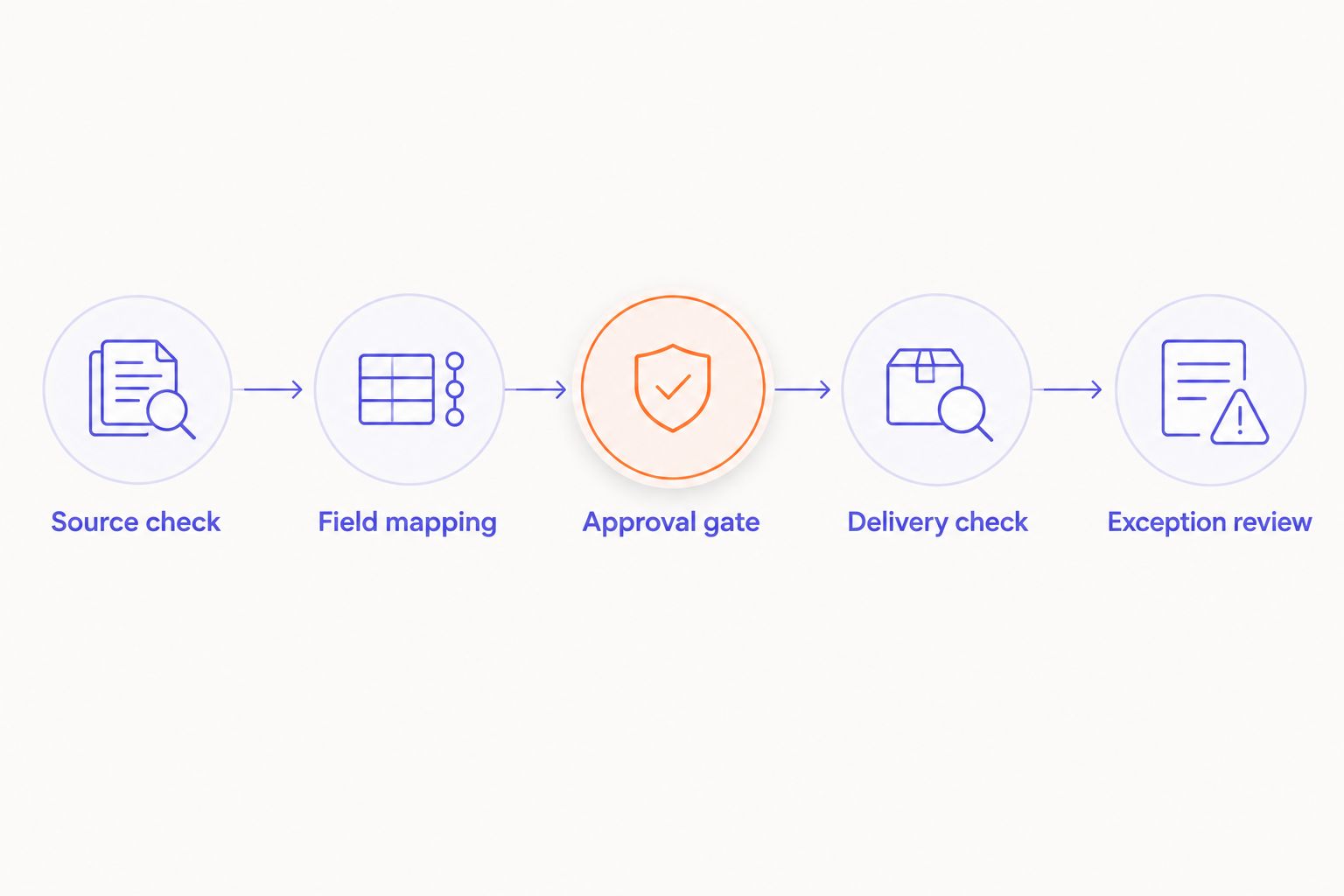
Set reconciliation frequency from the business's tolerated stale-content window, API constraints, and recovery capacity. Do not accept an arbitrary schedule from a proposal. Ask the supplier to show how a missed event is detected without someone noticing the storefront first.
The same ownership discipline applies to Shopify integration services for ERP order accuracy, but this content workflow should not silently expand into order processing.
Publish Sitecore content updates to the storefront
The adjacent workflow starts with an editorial change rather than a Shopify product update. Use it when Sitecore owns campaign modules, product storytelling, or other approved content displayed alongside Shopify commerce data.
- Start at publication. Use a publication notification or equivalent supported mechanism for your Sitecore deployment. Do not treat every draft save as permission to refresh public content.
- Resolve dependencies. Identify the storefront pages and components that reference the published content. Maintain those references explicitly rather than guessing from matching names.
- Refresh the intended pages. Invalidate or revalidate the affected content only after delivery exposes the approved revision. Include language and market context.
- Verify withdrawal. Test unpublishing and deletion as well as publication. Remove stale rendered output and apply the agreed missing-content behavior.
Expected result: An approved Sitecore edit reaches its dependent pages without writing editorial content into Shopify-owned fields.
For your 2026 release, reject any demonstration that shows only a successful publish. Ask for an unpublish, a failed refresh, and recovery from the same failure. Those paths expose whether the integration has an operating model or just a happy-path demo.
Troubleshooting
Product updates overwrite approved editorial copy
Fix the ownership mapping before replaying events. Remove editorial fields from the Shopify write set, restore the approved content through the editorial process, and replay a controlled sample. Check whether a broad object replacement is overwriting fields that the integration never intended to own.
Sitecore shows the change, but the storefront does not
Check each boundary separately. Confirm the intended language version, publication status, delivery response, and rendered cache. A correct authoring view does not establish that the public delivery layer contains the change.
Duplicate or delayed events restore old values
Make writes idempotent and reevaluate current source state. Inspect the event identifier, processing history, and destination mapping. Stop processing by arrival order alone; a delayed event must not reverse a newer authoritative value.
A renamed product creates a second content record
Replace the title or handle join with the stored Shopify identifier. Reconcile existing duplicates under editorial supervision, preserve references to the retained record, and test another rename. Do not automatically delete duplicate content that still has page dependencies.
Deleted products leave broken editorial modules
Add retirement handling and dependency checks. Identify affected pages, apply the agreed suppression or review rule, and verify the public result. Deletion events need a deliberate outcome, not a failed product lookup buried in a queue.
Customize your workflow
Expand scope only after you can replay failures without corrupting content. Add language coverage, shared campaign components, or additional product references one controlled change at a time. Keep inventory and order workflows separate unless their ownership and recovery rules are also defined.
DigiForm offers Shopify development and replatforming consulting alongside implementation services. For this integration, make the buying conversation concrete: the ownership contract, acceptance evidence, recovery procedure, and ongoing operating responsibility.
Ask any supplier:
- Who approves a change to field ownership?
- What happens when Sitecore publication succeeds but storefront refresh fails?
- Can an operator replay a failed change without editing production data manually?
- Who covers incidents during peak trading and a code freeze?
- What evidence proves the connection reduced reconciliation work?
Defer custom integration when an editorial link or simpler content boundary solves the problem. DigiForm's consultancy model is relevant when you need implementation and operating ownership; it is not a substitute for a packaged connector procurement requirement.
Scope the integration boundary
Discuss field ownership, publishing controls, recovery, and ongoing Shopify operating responsibility.
FAQ
What's the safest Shopify Plus Sitecore integration approach?
The safest design gives each shared field one authoritative source and makes integration effects idempotent. Add controlled publishing, reconciliation, and an owned recovery process rather than unrestricted two-way synchronization.
Do I need to move all Shopify product content into Sitecore?
No. Move or reference only the content required by your rendering and editorial design. Copying unused fields creates additional reconciliation work without improving the storefront.
Can Shopify Plus and Sitecore synchronize in both directions?
They can participate in workflows that originate in either platform, but each field should still have one owner. Keep Shopify commerce updates separate from Sitecore editorial publication rather than allowing both systems to overwrite the same field.
Does this setup work the same way across Sitecore products?
No. Sitecore XM Cloud, XP, and Content Hub have different authoring and delivery arrangements. Confirm your deployed product before selecting APIs, publication triggers, and permissions.
How do I stop duplicate webhooks from creating duplicate content?
Persist event identifiers and make destination writes idempotent. Map records through stable product identifiers, and test duplicate delivery before approving production release.
What should a Shopify Plus Sitecore integration supplier demonstrate?
Require a successful update, duplicate delivery, editorial protection, unpublishing, and recovery from a failed storefront refresh. The supplier should also name the operator responsible for reconciliation and incident response.
When should I defer a Shopify Plus Sitecore integration in 2026?
Defer the integration when you cannot establish field ownership, fund ongoing operation, or justify the build against current operating costs. Resolve those decisions before buying a connector or commissioning custom code.
One last thing
The most revealing acceptance test is a change that must not propagate. Before your 2026 launch, edit an editorial-owned field, then replay a Shopify update against the same product. The integration passes only if the approved editorial value stays intact and the commerce-owned change still reaches its destination.