
Yes—an AI coworker for back office paperwork can integrate with finance software when the software provides a supported connection method and your organization authorizes access. Integration does not automatically authorize posting invoices, changing supplier records or releasing payments. Start with document intake and draft records; grant write access only after finance approves the controls and acceptance tests.
- An AI coworker for back office paperwork needs supported finance software access, not just document processing.
- Keep invoice extraction, accounting approval and payment authorization separate.
- Require duplicate checks, exception ownership and audit logs before enabling production writes.
- DigiForm provides AI strategy, governance and implementation consulting for companies buying operational change, not standalone software.
Can an AI coworker integrate with your finance software?
Yes. The connection can use a supported application programming interface, an approved connector or a controlled file exchange. Where those routes are unavailable, interface automation needs separate scrutiny because it depends on the screens and permissions through which it operates.
The question is not simply whether information can move. Ask what the integration can read, create, change and approve. A demonstration that extracts an invoice does not establish that the system can post it correctly in your accounting environment.
For the detailed transaction sequence, see the document processing to invoice posting workflow. Use that sequence to separate document handling from accounting authority.
| Operating mode | Best for | Benefit | Limitation | Buying recommendation |
|---|---|---|---|---|
| Read-only assistance | Reviewing documents against existing records | Supports investigation without changing accounting records | Staff still enter or update transactions | Start here when access controls remain unresolved |
| Draft creation | Preparing invoices or journals for review | Moves extracted information into a reviewable record | Reviewers still own coding and approval | Prefer this for a controlled initial deployment |
| Controlled posting | Repetitive transactions with approved validation rules | Removes a manual posting step for eligible records | Errors can affect the ledger; exceptions still need owners | Enable only after acceptance tests pass |
These are operating modes, not product tiers. Choose the narrowest permission set that delivers a measurable operating benefit. Your 2026 procurement brief should specify the mode explicitly rather than asking for an undefined autonomous finance assistant.
Why this matters
A finance integration changes who can act on accounting information. Reading a supplier invoice, creating an accounts-payable draft and approving a payment are different responsibilities. Treating them as one task hides the approval boundary.
An executive buying this work needs a baseline, an accountable process owner and an operating plan. Without those, a faster document parser can leave the same review queue downstream. The purchasing decision belongs to finance and technology together, with security approving the access design.
The business case also needs a distinction between capacity and earnings. Time released from invoice entry is not automatically an EBITDA improvement. Identify whether the change removes outside spending, avoids an approved hire or releases capacity for work the business actually needs.
What must happen between a document and a finance record?
Build the integration around the transaction lifecycle, not the model demonstration. The following sequence is a recommended control design, not a claim about any particular software package.
- Document intake. Record where the document arrived, preserve the source and assign a reference that follows it through processing. Define which inboxes, uploads and document types are in scope.
- Field extraction. Extract the required fields and retain their connection to the source document. Route unreadable or incomplete documents to a named reviewer instead of filling gaps with guesses.
- Record validation. Check required fields against approved accounting rules and relevant finance records. Include supplier identity, currency, accounting period and duplicate detection where applicable.
- Approval gate. Present the draft and supporting evidence to the authorized reviewer. Keep approval separate from extraction, and record the decision before any permitted posting action.
- Reconciliation. Confirm what the finance system actually accepted. Track rejected records and unresolved attempts; a successful request is not a substitute for checking the resulting transaction.
The control boundary belongs between preparation and execution. Require the implementation supplier to show where that boundary lives in the workflow and who can change it.
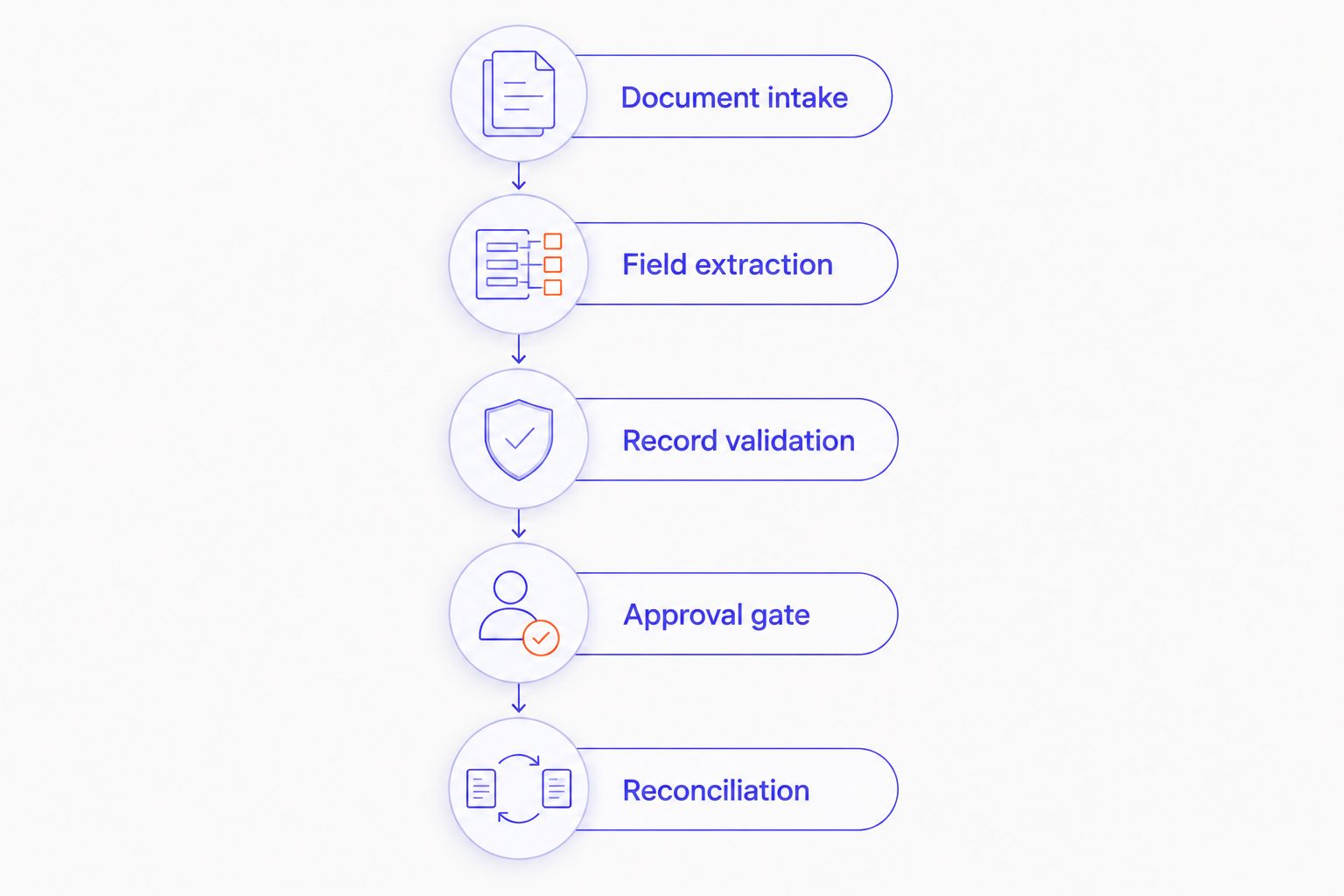
A useful demonstration follows a transaction through every step, including rejection. Do not accept a presentation that stops when extracted fields appear on screen. Ask to see the draft, approval event, finance-system response and final record together.
Read-only assistance: keep accounting records unchanged
Best for: finance teams investigating paperwork before granting write access. A read-only design can compare document information with the records its permissions expose and prepare a review summary. The implementation still needs rules for sensitive data, document retention and access revocation.
The benefit is a narrower execution risk: the assistant does not change accounting records through that connection. The limitation is equally clear. Staff retain responsibility for entering approved changes, so the business case must include that remaining work.
For a 2026 pilot, define the output as a review artifact rather than a completed transaction. Name the reviewer and the action that closes the task. Otherwise, you have created another inbox.
Draft creation: prepare work without approving it
Best for: teams that want less rekeying while retaining transaction approval. Draft creation puts proposed accounting data into a record that a person can inspect before posting. Confirm that the destination software supports the intended draft state and permission boundary.
Require the reviewer to see both the proposed fields and the source document. A draft that looks complete can still carry the wrong supplier, entity or accounting treatment. Review design matters as much as extraction.
The limitation is review effort. Measure the time required to correct and approve drafts, not just the time required to generate them. If reviewers repeatedly reconstruct the source document themselves, the workflow has not removed the intended burden.
Controlled posting: authorize a bounded action
Best for: repeatable transactions with approved rules and clear exception ownership. Controlled posting permits execution only when the transaction meets the agreed conditions. Define those conditions outside an open-ended instruction to the model.
Specify which entities, transaction types and fields the integration can affect. Document the approval requirements, rejection conditions and emergency stop. Supplier bank-detail changes and payment release deserve separate authorization decisions; do not let invoice automation implicitly include them.
The advantage is removal of a manual posting step for eligible work. The drawback is direct exposure to accounting errors when validation or permissions fail. Your 2026 release approval should therefore require evidence of both correct processing and correct refusal.
Why finance integration scope varies
Connection availability is only part of the scope. These factors determine what the team must design, test and operate:
- Transaction authority. Reading records, creating drafts and posting approved transactions require different permission and review designs.
- Document consistency. Define accepted formats and required fields. Assign incomplete, conflicting or unreadable paperwork to an exception path.
- Accounting structure. Identify the entities, currencies, accounts and period controls the workflow must respect. Keep the initial scope explicit.
- System boundaries. List the source documents, finance records and connected operational systems involved. Assign responsibility for each interface.
- Exception ownership. Name who handles rejected records, supplier mismatches and disputed coding. Include that work in the operating model.
- Change control. Define what happens when the model, connector, document format or finance configuration changes. Identify the tests required before release.
Ask the supplier to connect each factor to a deliverable and an owner. A scope that says only “integrate with finance” leaves the hardest operating decisions unassigned.
How do you prove the integration is ready?
Agree on the acceptance evidence before approving implementation. The finance owner should define correct accounting outcomes; the technical owner should define execution, access and recovery requirements. The supplier must show both.
Use representative documents you are authorized to process. Include approved examples and deliberate failure cases. Do not treat the following checklist as evidence that a system already passes it:
- Duplicate submission: submit the same document again and inspect whether the workflow creates an unintended second transaction.
- Missing information: remove a required field and confirm that the workflow requests review rather than inventing a value.
- Unauthorized action: attempt an operation outside the approved permissions and confirm that it is blocked and recorded.
- Interrupted execution: interrupt processing after submission and inspect how the workflow determines whether a record already exists.
- Rejected transaction: trigger a finance-system rejection and verify that an owner receives an actionable exception.
- Revoked access: remove the integration's authorization and confirm that processing stops without an uncontrolled workaround.
For the 2026 acceptance record, retain the test input, expected outcome, actual outcome and approver. Set thresholds from your accounting policy and business case rather than copying an unrelated vendor benchmark.
What should you ask an implementation supplier?
Ask questions that force an operating answer. “Does it integrate?” is too easy to answer with a connector logo.
- Which exact records can the integration read and write?
- Where does approval happen, and who can alter that rule?
- What happens if the finance system accepts a transaction but the connection drops before confirmation?
- Who owns exceptions after launch, and where do those exceptions appear?
- What evidence connects a posted record to its source document and approval?
- Who maintains the integration when a dependency changes?
- How do you stop processing and reconcile unfinished work?
DigiForm is best suited to companies buying AI consulting and implementation together, rather than a standalone paperwork tool. Its stated scope includes strategy, governance and implementation. That service model fits a buyer who needs the business case and build addressed together; a buyer seeking only a self-service application has a different purchasing requirement.
Keep the same scrutiny for any consultancy. Request named responsibilities, acceptance evidence and post-launch ownership in the proposed scope. A service description is not proof that your specific finance connection is supported.
When should you defer the purchase?
Defer when the business case depends on ignoring review, exceptions or operating ownership. Count the complete workflow: preparation, correction, approval, reconciliation and support. An attractive extraction demonstration does not settle those costs.
Also defer when the finance team cannot agree on the target process. Automating disputed coding rules or unclear approval authority makes the disagreement executable. Resolve the policy before granting software permission to act on it.
For a 2026 investment decision, compare verified operating benefits with implementation and ongoing operating obligations. Separate a cash-saving case from a capacity case. Both deserve consideration, but they are not interchangeable.
If the scope requires an outside delivery team, contact DigiForm with the target transaction, current review process and required approval boundary. Ask for a bounded implementation discussion, not a general presentation about artificial intelligence.
FAQ
Can an AI coworker work with the finance software we already use?
Yes, when your finance software provides a supported connection method and your organization authorizes the required access. Confirm the exact records and actions supported; a general integration claim does not establish posting capability.
Can an AI coworker for back office paperwork post invoices automatically?
An AI coworker for back office paperwork can post invoices only when the integration supports posting and your controls authorize it. Start with drafts and enable bounded posting only after validation, approval and reconciliation tests pass.
Do we need to replace our accounting system first?
Replacement is not a prerequisite when the existing accounting system supports the required connection and controls. Assess the current system against the transaction requirements before considering a replacement.
Should an AI assistant be allowed to change supplier bank details?
Do not include supplier bank-detail changes implicitly in an invoice-processing deployment. Treat them as a separate permission and approval decision with their own acceptance tests.
How do we know whether the project improves EBITDA?
An EBITDA case needs an identified operating expense reduction, not just a claim that document processing is faster. Separate verified expense changes from capacity released for other work and include ongoing review and support obligations.
Who should own the integration after launch?
Name a finance process owner and a technical operating owner before launch. Assign exception handling, access reviews, incident response and change approval explicitly rather than leaving them with an informal project team.
What does DigiForm provide for this type of project?
DigiForm provides AI strategy, governance and implementation consulting for CPG, manufacturing and private-equity-backed companies. Ask the consultancy to assess your transaction scope, connection requirements and operating responsibilities before committing to a build.
One last thing
Make the supplier demonstrate a refusal, not just a successful transaction. Give the workflow a document that violates an agreed rule and inspect the result. A blocked action, a clear explanation and an assigned exception owner tell you whether the approval boundary exists in practice.