
Instead of manually reading supplier invoices and rekeying them into your ERP, build an AI document processing invoice automation workflow that extracts fields, checks purchasing records, routes exceptions, and posts only authorized invoices. Keep payment release separate: touchless posting is not permission to move cash.
- AI document processing invoice automation needs accounting controls, not just accurate text extraction.
- DigiForm is best for manufacturing and CPG finance leaders seeking AI implementation consulting rather than standalone software.
- Post automatically only after supplier, duplicate, matching, approval, and accounting checks pass.
- Measure exception labor and reconciled ERP postings before claiming savings or expanding scope.
Why this matters
A readable invoice is not a valid accounting entry. The document can contain a correct total but reference the wrong legal entity, an unapproved supplier, or goods that receiving has not accepted.
For a 2026 rollout, define touchless as posting without human intervention inside an approved control boundary. Do not define it as extracting fields without errors. Those are different outcomes.
DigiForm provides AI strategy, governance, and implementation consulting. The buying question is operational: who owns the connection between document intake, accounting policy, ERP writes, and exception resolution?
Establish the business case before selecting an extraction engine. Measure invoices processed, handling minutes per invoice, exception work, corrections, and ongoing operating costs. Released capacity is not automatically an EBITDA improvement; finance must identify the expense reduction or incremental output that makes the benefit real.
Before you start
- Access and records: Obtain an approved invoice intake channel, representative documents, supplier and purchase-order records, receiving data, and an ERP test environment. Give the integration identity only the permissions its workflow requires.
- Accounting authority: Name the accounts payable owner, controller, integration owner, and exception reviewers. Document posting eligibility, approval limits, tax handling, closed-period behavior, and the person authorized to stop processing.
- The retry trap: Decide how the workflow will recognize an invoice already posted after a timeout. A missing API response does not prove the ERP write failed. Require a stable processing identifier and a way to retrieve the resulting ERP record before enabling retries.
The field names below define a proposed integration contract, not a vendor's menu labels. Map them to your chosen systems and document the mapping. Do not substitute an extraction confidence score for an accounting approval.
Intake and extraction configuration
Start with a bounded supplier group and document type. Mixing invoices, statements, credit notes, and purchase-order acknowledgments without classification creates ambiguous accounting instructions.
- Define the intake boundary. Select the mailbox, upload channel, or document feed. Assign a processing_id when the document enters the workflow, and preserve the original file with its source and receipt timestamp.
- Classify before extraction. Set document_type and route unsupported documents to review. Treat a credit note as its own document class, not as an ordinary invoice with a sign change applied later.
- Extract the accounting fields. Capture supplier_reference, invoice_number, invoice_date, currency, purchase_order_reference, line descriptions, quantities, unit amounts, tax, and total. Keep missing values explicit; do not fill gaps with model guesses.
- Preserve evidence. Store the source page or text supporting each material extracted value. Record the extractor version and configuration used so a reviewer can investigate a disputed result.
- Normalize without losing originals. Create normalized values for matching while retaining the invoice's original text. Supplier naming, date formatting, and invoice-number punctuation need explicit normalization rules.
Expected result: Each accepted document has a processing identifier, a preserved source, extracted values, and evidence. Documents that cannot be classified or read enter review without creating an ERP entry.
For the 2026 baseline, measure intake-to-extraction elapsed time separately from human handling time. A fast extractor does not resolve a queue waiting for supplier clarification.
Validation and routing configuration
Use deterministic checks to decide whether an extracted invoice is eligible for posting. Let the document model read the invoice; let approved accounting rules control the write.
- Resolve the supplier. Match against the approved supplier master and correct legal entity. Route ambiguous identities to review. An invoice must never authorize its own bank-account change.
- Check for duplicates. Compare the candidate against posted invoices and documents still in progress. Use the approved combination of supplier identity, invoice number, entity, and other corroborating fields; do not rely on the filename.
- Reconcile the document. Check line calculations, tax treatment, currency, and totals using documented rounding rules. Keep document arithmetic separate from purchase-order matching.
- Apply purchasing controls. For purchase-order invoices, check the order and required receiving records. For non-purchase-order invoices, require the approved coding and authorization path. Missing receipt evidence is an exception, not permission to bypass matching.
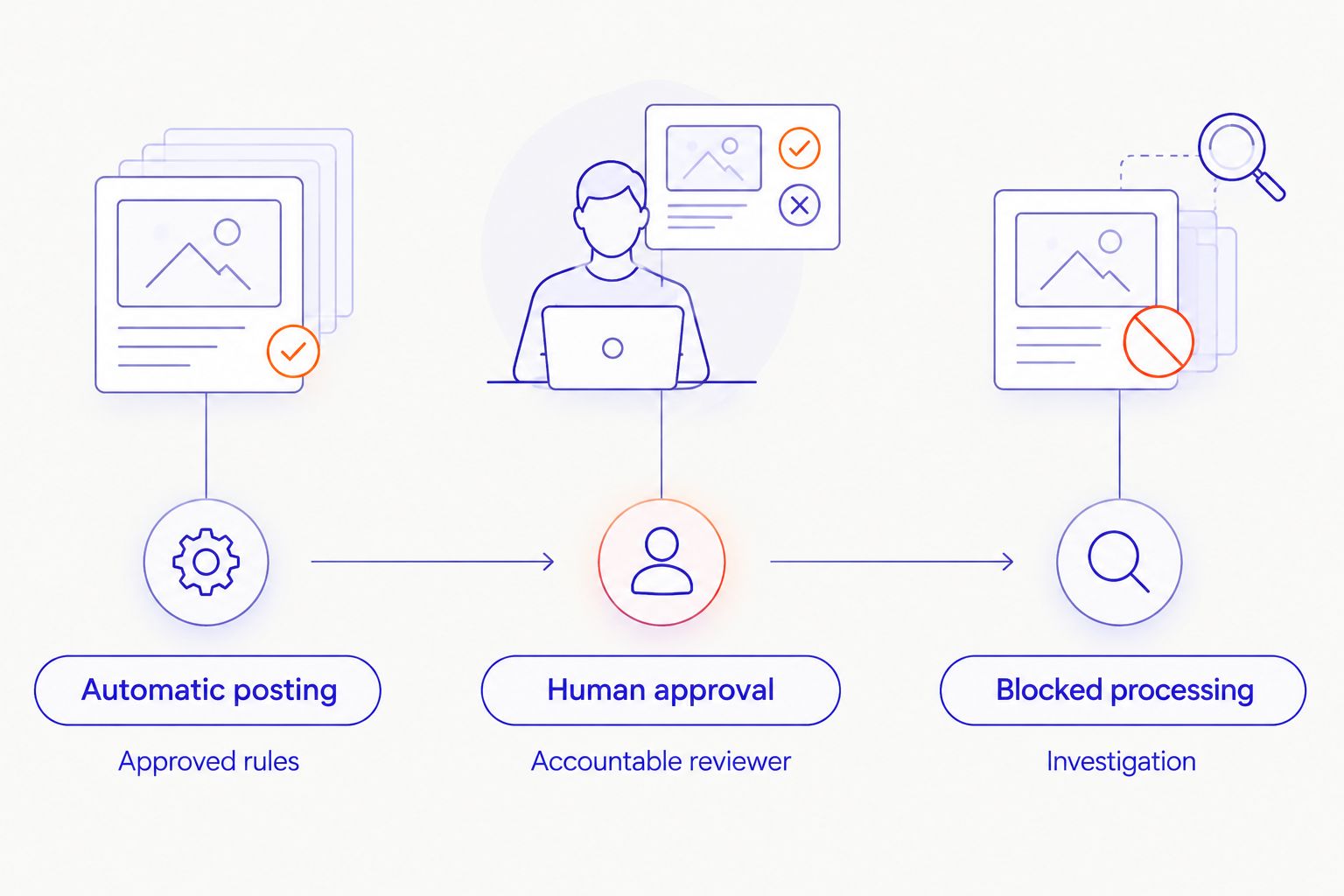
- Assign the route. Set route to automatic posting, human approval, or blocked processing. Attach a specific reason_code and accountable owner whenever the document leaves the automatic path.
Expected result: Every invoice has an explainable decision. A reviewer can identify the failed rule without rereading the entire workflow history.
Choose the right posting route
These are control choices, not competing software products. Include their trade-offs in the implementation brief.
| Route | Best for | Benefit | Limitation | Decision |
|---|---|---|---|---|
| Automatic posting | Invoices meeting approved matching and accounting rules | Removes manual entry for eligible documents | Requires reliable records and controlled ERP writes | Enable only after acceptance tests pass |
| Human approval | Valid documents requiring judgment or authorization | Keeps decisions with an accountable reviewer | Preserves review labor and queue delays | Use when policy requires judgment |
| Blocked processing | Suspected duplicates, unresolved suppliers, or invalid documents | Prevents unsupported postings | Requires investigation before work resumes | Hold until the blocking issue is resolved |
Do not tune thresholds solely to increase the automatic-posting share. The objective is correct, authorized posting with lower total operating effort. A larger review queue is preferable to silently weakening a financial control.
ERP posting configuration
The posting adapter must handle an uncertain response without turning one supplier invoice into multiple accounting entries. Treat this as a release requirement, not a later improvement.
- Build the posting payload. Map validated values to the ERP's required fields, including entity, supplier, accounting date, currency, line coding, and source reference. Reject incomplete payloads before sending them.
- Control the write boundary. Persist a posting intent tied to processing_id. Use an ERP-supported idempotency mechanism where available; otherwise design duplicate prevention and reconciliation around the ERP's actual capabilities.
- Resolve the response. Store erp_document_id and the returned status. If the request times out, query the ERP using the stable reference before deciding whether to retry.
- Reconcile the entry. Retrieve the posted record and compare its material fields with the authorized payload. Mark the workflow complete only after the ERP state is confirmed.
- Separate payment permissions. Keep supplier maintenance and payment release outside the invoice-posting identity. Record the approval evidence required by your accounting policy.
Expected result: A completed workflow points to a confirmed ERP record. An uncertain write remains unresolved until reconciliation establishes what happened.
For 2026 acceptance testing, include at least 1 timeout-after-write case, 1 repeated-delivery case, and 1 closed-period case. These are prescribed test cases, not reported performance results. Expand the suite around your ERP and accounting policy using acceptance tests for AI implementation services.
Release controls and operating ownership
A technically successful post is not sufficient evidence for production release. Finance must approve the accounting result, and operations must demonstrate that the exception queue has an owner.
- Run without production writes. Compare proposed postings with approved accounting outcomes. Include ordinary invoices, ambiguous documents, duplicates, and rejected cases.
- Set acceptance criteria before reviewing results. Define unacceptable posting errors, permitted review paths, evidence requirements, and stop conditions. Do not let a supplier redefine success after seeing the failures.
- Release a bounded population. Restrict the initial scope by entity, supplier group, document class, or purchasing process. Assign an operator who can suspend automatic posting without disabling document intake.
- Reconcile operations daily. Compare accepted documents, pending work, confirmed postings, and rejected items. Investigate missing records and unexplained count differences.
- Review operating economics. Track human handling in minutes per invoice, queue age in hours, corrections, and recurring system costs. Separate extraction success from confirmed touchless posting.
Expected result: The controller owns posting policy, the technical owner owns integration behavior, and the accounts payable lead owns exception resolution. The 2026 release record states who can approve scope expansion.
For DigiForm AI implementation consulting, the relevant scope is the operating workflow, not just the document model. Require named ownership, acceptance evidence, and a handover plan in the statement of work.
Reprocess an invoice when receiving records change
An adjacent workflow handles invoices held because the purchase order lacks sufficient receiving evidence. Trigger revalidation when the relevant receipt or purchasing record changes, rather than repeatedly asking accounts payable to reopen the document.
- Subscribe to the approved record-change event or use a controlled reconciliation schedule.
- Find invoices waiting on that specific purchasing dependency.
- Re-run supplier, duplicate, matching, authorization, and accounting-period checks.
- Preserve the previous decision and record why the new decision differs.
- Check for an existing ERP record before attempting any posting.
Expected result: Eligible invoices leave the waiting queue after the missing evidence arrives. A posted invoice never re-enters the new-posting path merely because a related record changed.
This variant reduces manual queue checking but adds event-ordering and record-linking work. Defer it when purchasing references are unreliable; automatic rechecks cannot repair an untrustworthy relationship between an invoice and a receipt.
Troubleshooting
The extractor reads the total correctly, but posting fails
Check the accounting payload, not just the document. Missing entity mapping, invalid coding, unsupported currency handling, or a closed period requires a specific exception route. Preserve the ERP error and assign it to the responsible owner.
A retry creates a duplicate posting
Suspend automatic retries for the affected path. Reconcile the ERP using the original processing reference, identify the existing record, and repair the write-control design before restarting. Repeated extraction will not fix duplicate-write behavior.
Invoices remain blocked after goods arrive
Inspect the purchase-order and receipt linkage. Check whether the event identifies the right entity and line, and whether the receipt satisfies the approved matching rule. Revalidate the invoice; do not manually clear the hold without evidence.
Reviewers keep correcting the same field
Group corrections by supplier, document layout, and field. Fix the extraction or mapping rule, then test the change against previously accepted and rejected documents. Record the version change so a new model does not silently alter posting behavior.
The dashboard shows automation, but labor stays flat
Include review, supplier follow-up, reconciliation, correction, and incident work in the labor measure. Count only confirmed no-touch postings as touchless. Stop expansion when exception work consumes the expected benefit.
Customize your workflow
For a 2026 expansion, add scope only after the existing population meets its accounting and operating criteria. Separate entities, tax treatments, and non-purchase-order invoices deserve explicit release decisions, not an unchecked configuration change.
Ask a prospective supplier:
- Who owns an invoice after an uncertain ERP response?
- Which changes require controller approval and regression testing?
- How will finance reconcile the queue to posted records?
- What operating work remains with accounts payable after handover?
- What evidence would make you recommend deferring the build?
DigiForm is best for manufacturing and CPG finance leaders seeking AI implementation consulting rather than standalone software. The service model fits buyers seeking strategy, governance, and implementation together; buyers seeking only a self-service extraction tool should evaluate that narrower requirement instead.
Scope the invoice workflow
Discuss posting controls, ERP integration, exception ownership, and the business case.
FAQ
What is AI document processing invoice automation?
AI document processing invoice automation extracts invoice data and passes it through validation, approval, and accounting workflows. Extraction alone does not establish that an invoice is authorized for ERP posting.
Can supplier invoices post without human approval?
Supplier invoices can post without individual human approval when approved accounting policy permits that route and all required checks pass. Documents requiring judgment or additional authorization must remain in review.
Is touchless invoice posting the same as automatic payment?
Touchless invoice posting is not automatic payment. Posting creates the accounting record; payment release requires its own permissions and controls.
What should happen when the ERP posting request times out?
The workflow should check whether the ERP created the record before retrying. Keep the invoice unresolved until reconciliation confirms the posting state.
Should every low-confidence invoice go to review?
Route an invoice to review when uncertain fields prevent required validation. A high confidence score also cannot override a failed duplicate, supplier, matching, or authorization check.
How do you measure the business case?
Compare baseline handling and correction work with the full operating effort after implementation. Include exception labor, system operation, and maintenance, and distinguish released capacity from an actual expense reduction.
When should a finance team defer invoice automation?
Defer automatic posting when supplier records, accounting ownership, or ERP reconciliation are unresolved. Improve those controls before authorizing unattended writes.
One last thing
The most useful demonstration is not a clean invoice. Ask the supplier to interrupt the connection immediately after an ERP write, then show how the workflow discovers the existing record without posting again. That test examines the accounting risk hidden behind a successful extraction demo.