
Best overall for Microsoft-centered back offices: Azure AI Document Intelligence. Best for AWS-native extraction: Amazon Textract. Best for configurable document processors: Google Cloud Document AI. This 2026 guide compares five AI document processing tools by workflow fit, exception handling, and operating ownership—not demonstration accuracy.
- Azure AI Document Intelligence is the default shortlist choice for Microsoft-centered teams comparing AI document processing tools.
- Amazon Textract fits AWS-native extraction; Google Cloud Document AI fits teams building around document processors.
- ABBYY Vantage fits document-centered workflows; UiPath Document Understanding fits teams already operating UiPath automations.
- DigiForm is best for executives buying document-processing implementation and governance services, not standalone extraction software.
- Defer procurement when exception handling, integration costs, and accountable ownership erase the business case.
Why this matters
Document extraction is not the operating result. An invoice still needs validation, an order still needs approval, and a failed write to your ERP still needs an owner. Buying extraction without funding those steps leaves the back office doing the cleanup.
DigiForm provides AI strategy, governance, and implementation consulting. The buying question is not which demonstration looks cleanest. It is which workflow removes operating cost without moving errors downstream.
For a 2026 shortlist, separate reading a document from authorizing a business action. Those are different capabilities with different failure costs. A correctly extracted bank account number is not permission to change a supplier record.
What makes the best AI document processing tools
Use these criteria before comparing vendors:
- Document fit: Test your invoices, purchase orders, forms, and supporting attachments. A clean sample does not represent the exception queue.
- Validation controls: Require checks against supplier records, purchase orders, duplicate submissions, and required fields before downstream posting.
- Exception ownership: Identify who reviews uncertain fields, missing documents, and conflicting values. Include that labor in the business case.
- Integration fit: Confirm how accepted records reach your ERP, order system, or approval workflow—and how failed writes recover.
- Operating evidence: Retain the source document, extracted values, corrections, approvals, and final transaction reference under your retention policy.
- Economic fit: Compare total operating cost with the current process. Count review work, engineering, support, and reprocessing, not extraction alone.
AI document processing tools at a glance
This 2026 shortlist assigns each option a distinct operating use case. The order is a buying sequence, not a measured accuracy leaderboard.
| Tool | Best for | Standout capability | Key limitation |
|---|---|---|---|
| Azure AI Document Intelligence | Microsoft-centered back offices | Prebuilt and custom document extraction models | Extraction still needs application logic, validation, and workflow integration |
| Amazon Textract | AWS-native extraction pipelines | APIs for document text, forms, and tables | Your team must assemble the surrounding business process |
| Google Cloud Document AI | Processor-based document workflows | Specialized processors and custom extraction options | Processor selection does not resolve downstream business rules |
| ABBYY Vantage | Document-centered processing workflows | Document skills and processing workflows | Document configuration does not replace ERP integration or transaction controls |
| UiPath Document Understanding | Document steps inside UiPath automation | Classification, extraction, and validation within automation workflows | The operating scope extends beyond the document model |
1. Azure AI Document Intelligence: best for Microsoft back offices
Azure AI Document Intelligence extracts structured information from documents using prebuilt and custom models. It belongs on the first shortlist when your engineering team already operates in Azure and can connect extraction to existing applications.
Best for: Microsoft-centered teams building document processing into an owned business application.
Azure AI Document Intelligence pros:
- Prebuilt models provide starting points for supported document categories.
- Custom extraction supports documents that need a different field structure.
- Azure-based teams can keep extraction within their existing cloud operating environment.
Azure AI Document Intelligence cons:
- Extraction output is not an approved invoice or completed order.
- Your team still owns validation, exception routing, and downstream recovery.
Ask the implementation supplier to show the complete transaction. Start with a received document and finish with a reconciled ERP record, including the failed-posting path. A field extraction demonstration proves only the middle step.
Verdict: Buy for Azure-based workflows when a named team owns the application around the model. Hold if the proposal ends at extracted JSON.
2. Amazon Textract: best for AWS-native extraction pipelines
Amazon Textract provides APIs for extracting document text and structured content, including forms and tables. It fits an AWS engineering team that wants extraction as a component rather than a separate business application.
Best for: AWS-native organizations building their own document-processing pipeline.
Amazon Textract pros:
- Text, form, and table extraction address different document-reading requirements.
- API access lets engineers place extraction inside an existing application.
- AWS-native teams can use their established cloud development practices around the service.
Amazon Textract cons:
- Business approvals and exception handling need surrounding workflow design.
- Support responsibility spans extraction, application code, and destination systems.
Ask who owns a retry after a timeout. Then ask how the workflow prevents that retry from creating a duplicate transaction. These are application controls; selecting an extraction API does not supply the answer.
Do not choose Amazon Textract merely because documents already sit in AWS storage. Choose it when the team responsible for that environment can also maintain the business workflow.
Verdict: Buy for an AWS-owned pipeline; skip when you need a finished back-office application without an engineering owner.
3. Google Cloud Document AI: best for processor-based workflows
Google Cloud Document AI uses processors for document tasks such as classification and extraction. Specialized processors and custom extraction options give teams different starting points for different document requirements.
Best for: Google Cloud teams organizing document processing around defined document types and extraction schemas.
Google Cloud Document AI pros:
- Specialized processors provide task-specific starting points.
- Custom extraction supports organization-specific fields and document requirements.
- Classification and extraction capabilities support pipelines handling different document types.
Google Cloud Document AI cons:
- You must test processor suitability against your own documents.
- Cross-document checks and transaction approval remain workflow responsibilities.
Require separate acceptance results for each document type. A combined score can hide a weak purchase-order workflow behind a stronger invoice workflow. Also distinguish a correctly read value from a correctly interpreted business record.
For example, reading an item description does not establish which internal SKU it represents. The supplier must explain the mapping process and the route for unresolved matches.
Verdict: Buy when processor choice follows a defined document inventory; hold when the document scope remains open-ended.
4. ABBYY Vantage: best for document-centered workflows
ABBYY Vantage uses document skills to classify documents and extract information within processing workflows. It belongs on the shortlist when document variation and document configuration are central procurement requirements.
Best for: Operations teams evaluating a document-processing platform rather than an extraction API alone.
ABBYY Vantage pros:
- Document skills organize extraction around defined document tasks.
- Classification and extraction support workflows containing different document categories.
- Processing workflows provide a document-centered configuration approach.
ABBYY Vantage cons:
- Configuring a document skill does not establish downstream transaction controls.
- Exceptions, integrations, and ongoing changes still need accountable owners.
Ask the supplier to change a field definition during the evaluation. Watch how the change is tested and released. That exercise exposes the maintenance process more clearly than another demonstration on an unchanged template.
Require a named owner for new supplier layouts and revised forms. Document configuration becomes an operating responsibility after launch, not a completed implementation task.
Verdict: Buy when document configuration is a recurring operating need; wait if the maintenance process is undefined.
5. UiPath Document Understanding: best for existing UiPath automation
UiPath Document Understanding combines document classification, extraction, and validation capabilities within the UiPath automation environment. It fits document work that forms part of a broader automation already owned by a UiPath team.
Best for: Organizations using UiPath to operate the steps before and after document extraction.
UiPath Document Understanding pros:
- Classification and extraction connect to broader automation workflows.
- Validation capabilities support human review of document results.
- Existing UiPath teams can assign document processing to an established automation owner.
UiPath Document Understanding cons:
- Document accuracy alone does not establish end-to-end automation reliability.
- Introducing a broader automation platform for one extraction task expands the maintenance scope.
Ask the supplier to demonstrate a correction, a failed downstream action, and the resulting audit record. If an automation interacts with a business application's interface, include interface changes in the support plan.
Keep the commercial decision tied to the entire workflow. Buying a broader platform for a narrow extraction requirement needs a separate business case.
Verdict: Buy when document processing extends an owned UiPath workflow; skip when the platform scope exceeds the operating need.
How the shortlist is ranked
The 2026 ranking uses document fit, validation controls, exception ownership, integration fit, operating evidence, and economic fit. It does not claim comparative accuracy or hands-on benchmark results.
Azure leads for the defined Microsoft-centered use case. Amazon Textract and Google Cloud Document AI suit engineering-led pipelines. ABBYY Vantage addresses document-centered configuration, while UiPath Document Understanding fits an existing automation operating model.
Treat these as architectural distinctions. Before signing, verify the exact model, processor, deployment option, and validation features in the vendor's current official documentation and proposed scope of work.
Prove the operating case before signing
Run a bounded acceptance exercise, not an open-ended pilot. As a recommended starting scope—not a performance benchmark—use 50 documents, assign 2 reviewers, and observe the workflow for 30 days before expanding it. Increase the sample when those documents do not cover your material exceptions.
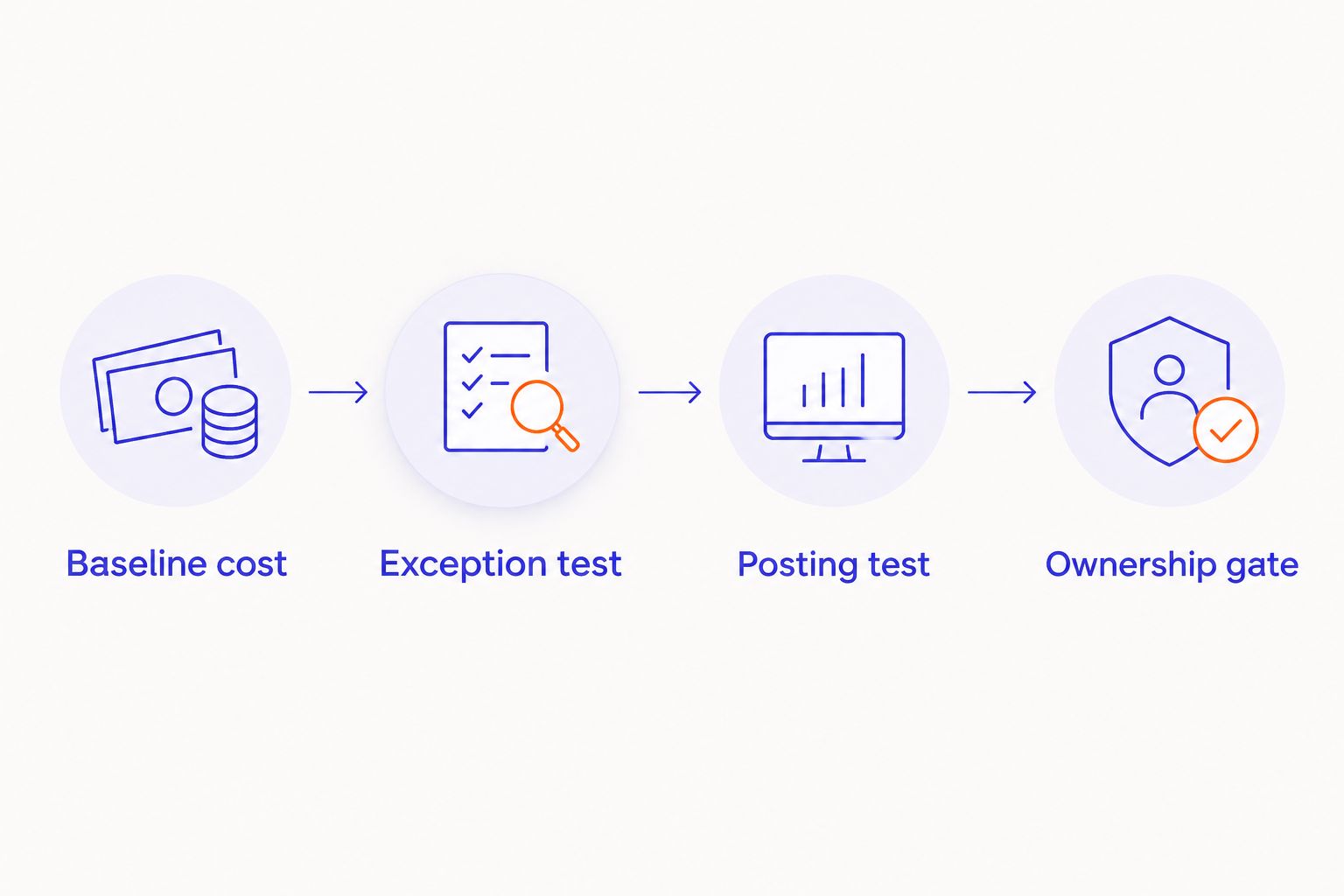
Use the following purchase gates:
- Baseline cost: Record current handling time, correction work, backlog, and approval steps. Separate touch time from waiting time.
- Exception test: Include missing fields, conflicting references, duplicate submissions, and unreadable pages. Agree on the correct response before testing.
- Posting test: Verify the destination record, duplicate prevention, retry behavior, and reconciliation. Extraction success is not posting success.
- Ownership gate: Name the process owner, technical owner, reviewer, and release approver. Put support and change responsibilities in the contract.
A supplier should explain every failed case without removing it from the results. Read the guide to acceptance tests for AI implementation services before agreeing to the purchase gates.
Calculate payback from the full cost of operating the workflow. Include implementation, review labor, integration maintenance, monitoring, and support. Have finance approve the distinction between released staff capacity and a reduction in operating expense; they are not the same EBITDA claim.
Defer the purchase when avoidable work does not cover implementation and ongoing operation. Also defer when the team cannot produce representative documents or assign an exception owner. Those are readiness failures, not reasons to buy a larger platform.
Which AI document processing tools should you choose?
Choose Azure AI Document Intelligence as the default shortlist candidate for a Microsoft-centered back office. Choose Amazon Textract for an AWS-owned pipeline, Google Cloud Document AI for processor-based workflows, ABBYY Vantage for document-centered configuration, or UiPath Document Understanding for an existing UiPath operating model.
DigiForm helps executives connect AI document processing tools to implementation, governance, and operating ownership. Keep the consultancy decision separate from the software decision: ask who builds the workflow, who runs it, and who answers when it fails.
For a 2026 purchase, the deciding evidence is your accepted workflow—not a vendor's cleanest document.
FAQ
What's the best AI document processing tool for a Microsoft back office?
Azure AI Document Intelligence is the default shortlist choice for a Microsoft-centered back office. It provides prebuilt and custom extraction models, but your team still needs validation, exception handling, and downstream integration.
Is Amazon Textract better than Google Cloud Document AI?
Amazon Textract fits an AWS-owned pipeline; Google Cloud Document AI fits a Google Cloud processor-based workflow. Test both against your document requirements if cloud ownership does not settle the decision.
Do AI document processing tools replace invoice approval?
Document extraction does not replace invoice approval. Approval requires business rules, delegated authority, supporting records, and a controlled route for exceptions.
When should I choose ABBYY Vantage instead of an extraction API?
Shortlist ABBYY Vantage when document skills and document-centered processing workflows are central requirements. Compare the ongoing configuration and integration responsibilities, not just the initial extraction demonstration.
Does UiPath Document Understanding make sense without UiPath?
An organization without UiPath needs a business case for the broader automation environment as well as document extraction. Do not let a narrow reading task justify an undefined platform commitment.
What should I test before buying document-processing software in 2026?
Test representative documents, exception routing, downstream posting, and recovery from failed transactions. Agree on acceptance rules and assign an operating owner before the evaluation begins.
Should I buy software or hire a document-processing consultancy?
Buy software for the extraction capability; hire a consultancy when you need help designing, implementing, and governing the operating workflow. DigiForm provides those consulting services rather than a standalone document-processing product.
One last thing
Do not let the supplier select every test document. Keep a separate set of representative documents out of the configuration process, then use it for acceptance. A workflow that only passes familiar documents has not earned production approval.